Raspberry PI Chessboard Camera: Difference between revisions
Jump to navigation
Jump to search
(→Links) |
|||
| Line 55: | Line 55: | ||
= Projects = | = Projects = | ||
{{Link|target=CV_Chess}} | |||
== play-chess-with-a-webcam == | == play-chess-with-a-webcam == | ||
* http://blogdugas.net/blog/2015/05/18/play-chess-with-a-webcam | * http://blogdugas.net/blog/2015/05/18/play-chess-with-a-webcam | ||
Revision as of 14:59, 21 October 2019
Chessboard Move Recorder
Motivation
see MagneticSensorChessBoard1987
Parts List
| # | picture | part | example sources | documents | ~ price |
|---|---|---|---|---|---|
| 1 | https://www.schachversand-ullrich.de/media/image/d3/fb/c5/Brett-Bundesliga_200x200.jpg | Chessboard | Wikipedia | 25 € | |
| 2 | https://www.schachversand-ullrich.de/media/image/37/70/16/Bundesliga57f787924d743_200x200.jpg | Chess pieces | Wikipedia | 25 € | |
| 3 |  |
Raspberry PI | Wikipedia | 45 € | |
| 4 |  |
Web Camera | Raspberry PI compatibility list (german) | 60 € | |
| 5 | 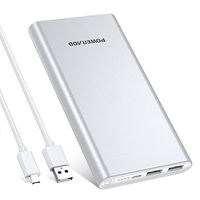 |
USB Powerbank | 15 € | ||
| 6 |  |
16 GByte Micro SD Card | 5 € |


Pictures
First Prototype


Second Prototype


Installation
see
- Raspberry_PI for Raspberry PI software installation
- Raspberry PI WebCam for the WebCam installation.
Projects
play-chess-with-a-webcam
see github fork at
Written in python2 migrated to python3.7. see https://unix.stackexchange.com/a/410851/38701 for selection your python version on Ubuntu
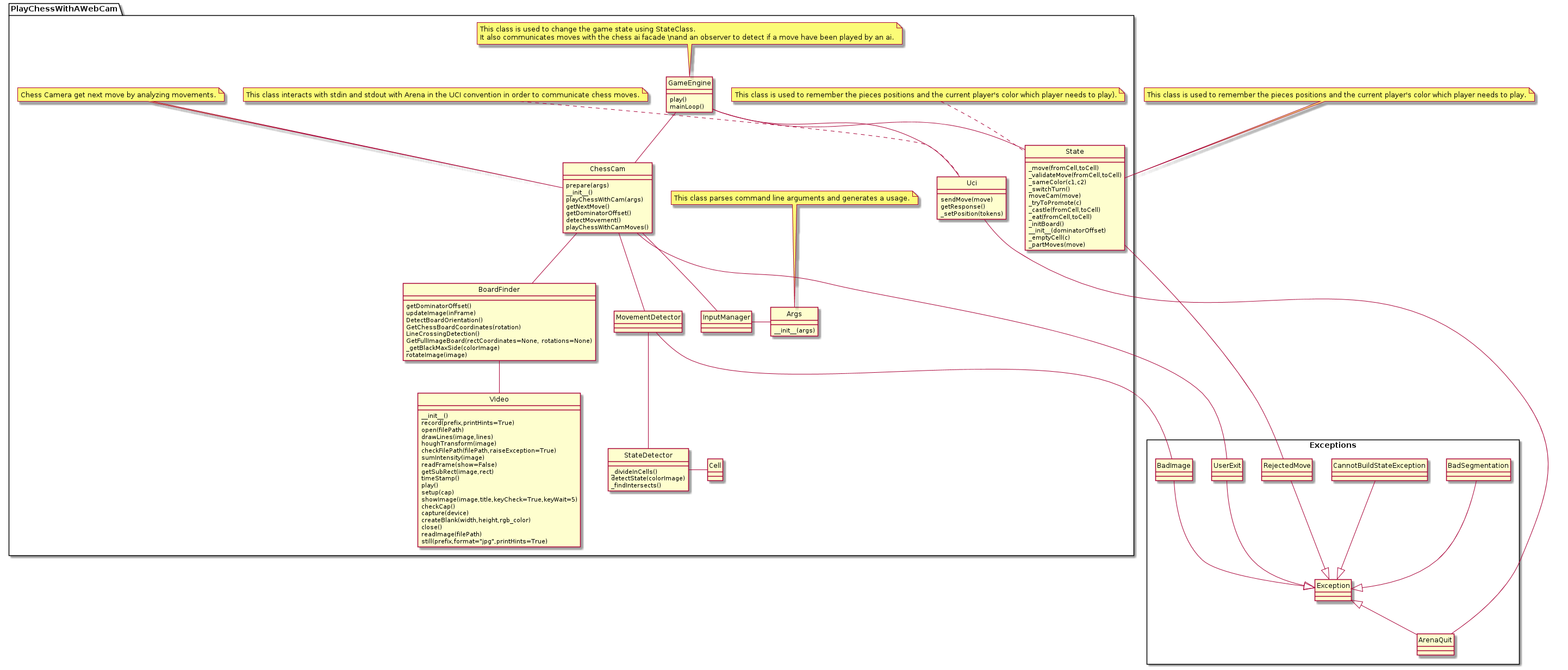
Code Structure
UCI compatible GUIs
XBoard
sudo apt-get install xboard polyglot stockfish
xboard -fUCI -fcp stockfish -sUCI -scp stockfish

Open Source Projects
- https://classes.engineering.wustl.edu/ese205/core/index.php?title=CV_Chess
- https://github.com/swenae/chesscam
- https://github.com/Rr9/ChessStory
- https://github.com/FabioBCI/pyChess
- http://www.romanmueller.de/chesscamera
- https://github.com/TheKrystek/ChessCam
- https://gitlab.fing.edu.uy/aricca/chessTrack
Commercial
Links
- https://en.wikipedia.org/wiki/Universal_Chess_Interface
- https://en.wikipedia.org/wiki/Chess_symbols_in_Unicode
- https://buildmedia.readthedocs.org/media/pdf/python-chess/
- https://en.chessbase.com/post/how-to-build-your-own-usb-electronic-che-board
- https://www.raspberrypi.org/magpi/chess-board-raspberry-pi/
- https://codereview.stackexchange.com/questions/220915/python-chess-game
- https://hobbylark.com/board-games/Top-5-Free-Chess-GUIs-for-UCI-Engines
- https://www.chessprogramming.org
- https://www.chessprogramming.org/UCI
- https://www.chessprogramming.org/Piece_Recognition
- https://stackoverflow.com/questions/27520991/opencv-best-way-to-detect-corners-on-chessboard
- https://stackoverflow.com/questions/5906170/detecting-chess-moves-from-successive-image-differences-using-opencv-tools
- http://www.nandanbanerjee.com/index.php?option=com_content&view=article&id=71:buttercup-chess-robot&catid=78&Itemid=470
- https://chess.stackexchange.com/questions/4695/tools-for-automated-notation-webcam-movie-to-pgn/4751#4751
- http://cs.uef.fi/~franti/chesscam/
- https://www.fide.com/contacts
- https://www.kickstarter.com/projects/infivention/square-off-worlds-smartest-chess-board-relaunched
- https://www.heise.de/make/projekte/ChessCamera-Schachcomputer-mit-Bilderkennung-2170835.html
- http://usbchessboard.yolasite.com/
- https://en.chessbase.com/post/you-built-what-a-giant-robotic-chess-set
- https://ieeexplore.ieee.org/abstract/document/6727033
- http://wiki.ros.org/tuw_checkerboard
- http://js1k.com/2010-first/demo/750
Videos