PlayChessWithAWebCam: Difference between revisions
Jump to navigation
Jump to search
No edit summary |
No edit summary |
||
| Line 8: | Line 8: | ||
|storemode=property | |storemode=property | ||
}} | }} | ||
== play-chess-with-a-webcam == | |||
* http://blogdugas.net/blog/2015/05/18/play-chess-with-a-webcam | |||
see github fork at | |||
* https://github.com/WolfgangFahl/play-chess-with-a-webcam | |||
Written in python2 migrated to python3.7. | |||
see https://unix.stackexchange.com/a/410851/38701 for selection your python version on Ubuntu | |||
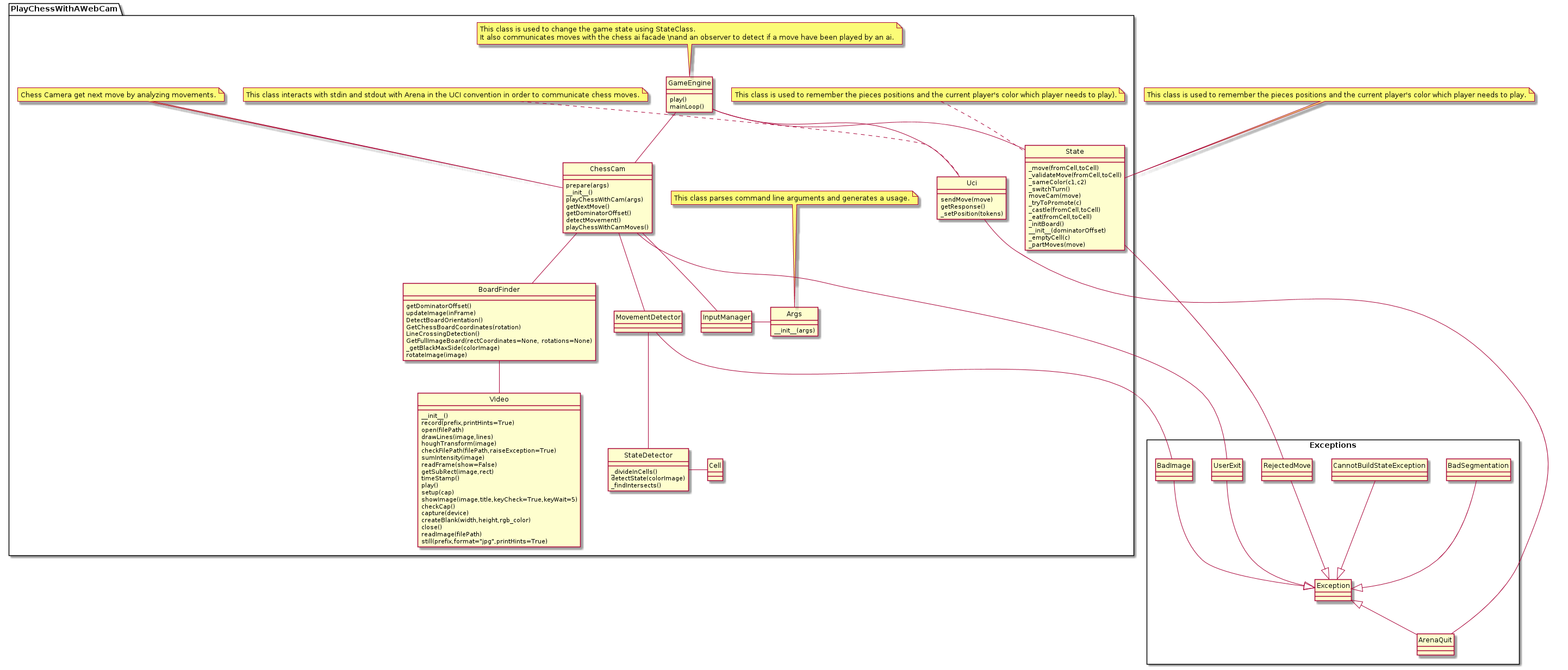
=== Code Structure === | |||
<uml> | |||
hide circle | |||
package Exceptions <<Rectangle>> { | |||
class ArenaQuit | |||
Exception <|-- ArenaQuit | |||
class BadImage | |||
BadImage --|> Exception | |||
class BadSegmentation | |||
BadSegmentation --|> Exception | |||
class CannotBuildStateException | |||
CannotBuildStateException --|> Exception | |||
class RejectedMove | |||
RejectedMove --|> Exception | |||
class UserExit | |||
UserExit --|> Exception | |||
} | |||
package PlayChessWithAWebCam { | |||
note top of Args: This class parses command line arguments and generates a usage. | |||
class Args { | |||
__init__(args) | |||
} | |||
class BoardFinder { | |||
getDominatorOffset() | |||
updateImage(inFrame) | |||
DetectBoardOrientation() | |||
GetChessBoardCoordinates(rotation) | |||
LineCrossingDetection() | |||
GetFullImageBoard(rectCoordinates=None, rotations=None) | |||
_getBlackMaxSide(colorImage) | |||
rotateImage(image) | |||
} | |||
class Cell { | |||
} | |||
note top of ChessCam: Chess Camera get next move by analyzing movements. | |||
class ChessCam { | |||
prepare(args) | |||
__init__() | |||
playChessWithCam(args) | |||
getNextMove() | |||
getDominatorOffset() | |||
detectMovement() | |||
playChessWithCamMoves() | |||
} | |||
note top of GameEngine: This class is used to change the game state using StateClass.\nIt also communicates moves with the chess ai facade \\nand an observer to detect if a move have been played by an ai. | |||
class GameEngine { | |||
play() | |||
mainLoop() | |||
} | |||
class InputManager | |||
class MovementDetector | |||
note top of State: This class is used to remember the pieces positions and the current player's color which player needs to play). | |||
class State { | |||
_move(fromCell,toCell) | |||
_validateMove(fromCell,toCell) | |||
_sameColor(c1,c2) | |||
_switchTurn() | |||
moveCam(move) | |||
_tryToPromote(c) | |||
_castle(fromCell,toCell) | |||
_eat(fromCell,toCell) | |||
_initBoard() | |||
__init__(dominatorOffset) | |||
_emptyCell(c) | |||
_partMoves(move) | |||
} | |||
class StateDetector { | |||
_divideInCells() | |||
detectState(colorImage) | |||
_findIntersects() | |||
} | |||
note top of Uci: This class interacts with stdin and stdout with Arena in the UCI convention in order to communicate chess moves. | |||
class Uci { | |||
sendMove(move) | |||
getResponse() | |||
_setPosition(tokens) | |||
} | |||
class Video { | |||
__init__() | |||
record(prefix,printHints=True) | |||
open(filePath) | |||
drawLines(image,lines) | |||
houghTransform(image) | |||
checkFilePath(filePath,raiseException=True) | |||
sumIntensity(image) | |||
readFrame(show=False) | |||
getSubRect(image,rect) | |||
timeStamp() | |||
play() | |||
setup(cap) | |||
showImage(image,title,keyCheck=True,keyWait=5) | |||
checkCap() | |||
capture(device) | |||
createBlank(width,height,rgb_color) | |||
close() | |||
readImage(filePath) | |||
still(prefix,format="jpg",printHints=True) | |||
} | |||
} | |||
GameEngine -- ChessCam | |||
GameEngine -- State | |||
GameEngine -- Uci | |||
Uci -- ArenaQuit | |||
ChessCam -- BoardFinder | |||
ChessCam -- MovementDetector | |||
ChessCam -- InputManager | |||
ChessCam -- UserExit | |||
BoardFinder -- Video | |||
MovementDetector -- StateDetector | |||
MovementDetector -- BadImage | |||
StateDetector - Cell | |||
note top of State: This class is used to remember the pieces positions and the current player's color which player needs to play. | |||
State -- RejectedMove | |||
InputManager - Args | |||
</uml> | |||
[[Category:Raspberry]] | [[Category:Raspberry]] | ||
[[Category:Chess]] | [[Category:Chess]] | ||
Revision as of 15:02, 21 October 2019
| OsProject | |
|---|---|
 edit edit
| |
| id | PlayChessWithAWebCam |
| state | |
| owner | Wolfgang Fahl |
| title | Play Chess With A WebCam |
| url | https://github.com/WolfgangFahl/play-chess-with-a-webcam |
| version | 0.0.1 |
| description | |
| date | 2019/10/21 |
| since | |
| until | |
play-chess-with-a-webcam
see github fork at
Written in python2 migrated to python3.7. see https://unix.stackexchange.com/a/410851/38701 for selection your python version on Ubuntu
Code Structure