SimpleGraph-Excel: Difference between revisions
Jump to navigation
Jump to search

| (13 intermediate revisions by the same user not shown) | |||
| Line 8: | Line 8: | ||
|url=https://en.wikipedia.org/wiki/Microsoft_Excel | |url=https://en.wikipedia.org/wiki/Microsoft_Excel | ||
|apiname=Apache POI XSSF/HSSF | |apiname=Apache POI XSSF/HSSF | ||
|apiurl=https://poi.apache.org/spreadsheet/quick-guide.html | |apiurl=https://poi.apache.org/components/spreadsheet/quick-guide.html | ||
|documentation=makes Microsoft Excel workbooks accessible via the Apache POI API | |documentation=makes Microsoft Excel workbooks accessible via the Apache POI API | ||
|storemode=property | |storemode=property | ||
|viewmode=hidden | |viewmode=hidden | ||
}} | }} | ||
= Mental Model = | = Mental Model = | ||
== Mapping rules == | |||
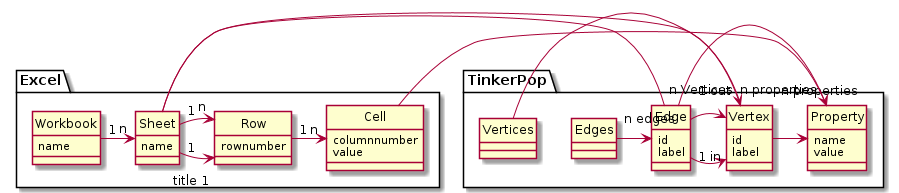
# Each Vertex type (by label) is converted to an Excel sheet | |||
# Each Edge type (by label) is converted to an Excel sheet | |||
# Each vertex is converted to a row | |||
# Each vertex property is converted to a cell | |||
# Each edge is converted to a row | |||
# Each edge property is converted to a cell | |||
# The header row for Vertices has a column for each property key | |||
# The header for for Edges has a column for each property key + an in and and out column | |||
# The in and out header columns for edges have the label of the corresponding vertex in parentheses | |||
== UML diagram == | |||
<uml> | <uml> | ||
hide circle | hide circle | ||
package Excel { | |||
class Workbook { | class Workbook { | ||
name | name | ||
| Line 33: | Line 47: | ||
Sheet "1" -> "n" Row | Sheet "1" -> "n" Row | ||
Row "1" -> "n" Cell | Row "1" -> "n" Cell | ||
} | |||
package TinkerPop { | |||
class Property { | |||
name | |||
value | |||
} | |||
class Vertex { | |||
id | |||
label | |||
} | |||
class Edge { | |||
id | |||
label | |||
} | |||
Edge -> "1 in" Vertex | |||
Edge -> "1 out" Vertex | |||
Vertex -> "n properties" Property | |||
Edge -> "n properties" Property | |||
Edges -> "n edges" Edge | |||
Vertices -> "n Vertices" Vertex | |||
} | |||
Cell - Property | |||
Edge - Sheet | |||
Vertex - Sheet | |||
</uml> | </uml> | ||
= | |||
= Examples = | |||
== Modern == | |||
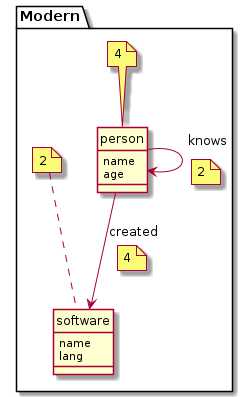
<uml> | |||
hide circle | |||
package Modern { | |||
note top of person: 4 | |||
class person { | |||
name | |||
age | |||
} | |||
note top of software: 2 | |||
class software { | |||
name | |||
lang | |||
} | |||
} | |||
person --> person: knows | |||
note on link: 2 | |||
person --> software: created | |||
note on link: 4 | |||
</uml> | |||
[[File:modern.xlsx]] | |||
== AirRoutes == | |||
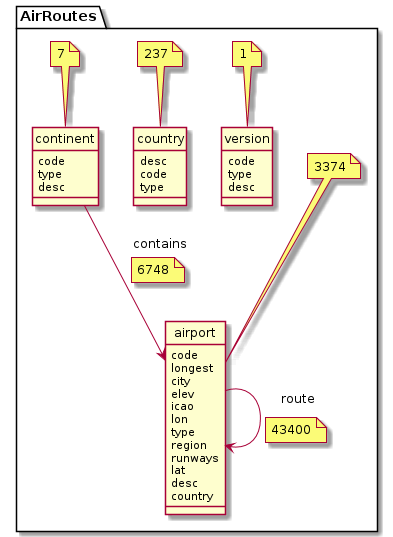
The UML diagram and excel table is not fully consistent with the graph. The graph can have contains edges between airport and country. | |||
<uml> | |||
hide circle | |||
package AirRoutes { | |||
note top of airport: 3374 | |||
class airport { | |||
code | |||
longest | |||
city | |||
elev | |||
icao | |||
lon | |||
type | |||
region | |||
runways | |||
lat | |||
desc | |||
country | |||
} | |||
note top of version: 1 | |||
class version { | |||
code | |||
type | |||
desc | |||
} | |||
note top of country: 237 | |||
class country { | |||
desc | |||
code | |||
type | |||
} | |||
note top of continent: 7 | |||
class continent { | |||
code | |||
type | |||
desc | |||
} | |||
} | |||
airport --> airport: route | |||
note on link: 43400 | |||
continent --> airport: contains | |||
note on link: 6748 | |||
</uml> | |||
[[File:air-routes.xlsx]] | |||
<source lang='java'> | |||
@Test | |||
public void testCreateExcelAirRoutes() throws Exception { | |||
ExcelSystem es = new ExcelSystem(); | |||
Graph graph = TestTinkerPop3.getAirRoutes(); | |||
GraphTraversalSource g = graph.traversal(); | |||
// es.setDebug(true); | |||
Workbook wb = es.createWorkBook(g); | |||
assertEquals(6, wb.getNumberOfSheets()); | |||
es.save(wb, testAirRouteFileName); | |||
} | |||
</source> | |||
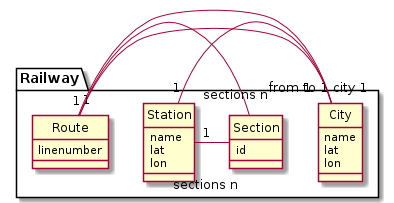
== Railway == | |||
<uml> | <uml> | ||
hide circle | hide circle | ||
Latest revision as of 08:06, 30 October 2018
SimpleGraphModule

SimpleGraph Excel module
The SimpleGraph Excel module makes Microsoft Excel workbooks accessible via the Apache POI API see Apache POI XSSF/HSSF.
Sources
- System: ExcelSystem.java
- JUnit-Test: TestExcelSystem.java
Mental Model
Mapping rules
- Each Vertex type (by label) is converted to an Excel sheet
- Each Edge type (by label) is converted to an Excel sheet
- Each vertex is converted to a row
- Each vertex property is converted to a cell
- Each edge is converted to a row
- Each edge property is converted to a cell
- The header row for Vertices has a column for each property key
- The header for for Edges has a column for each property key + an in and and out column
- The in and out header columns for edges have the label of the corresponding vertex in parentheses
UML diagram
Examples
Modern
AirRoutes
The UML diagram and excel table is not fully consistent with the graph. The graph can have contains edges between airport and country.
@Test
  public void testCreateExcelAirRoutes() throws Exception {
    ExcelSystem es = new ExcelSystem();
    Graph graph = TestTinkerPop3.getAirRoutes();
    GraphTraversalSource g = graph.traversal();
    // es.setDebug(true);
    Workbook wb = es.createWorkBook(g);
    assertEquals(6, wb.getNumberOfSheets());
    es.save(wb, testAirRouteFileName);
}
Railway