Pynomina: Difference between revisions
(Created page with "{{OsProject }}") |
No edit summary |
||
| (27 intermediate revisions by the same user not shown) | |||
| Line 1: | Line 1: | ||
=OsProject= | |||
{{OsProject | {{OsProject | ||
|id=pynomina | |||
|state=active | |||
|owner=WolfgangFahl | |||
|title=pynomina | |||
|url=https://github.com/WolfgangFahl/pynomina | |||
|version=0.0.11 | |||
|description=personal finance tool | |||
|date=2025-03-26 | |||
|since=2024-10-06 | |||
}} | }} | ||
= Demo = | |||
https://nomina.bitplan.com | |||
= Introduction = | |||
pynomina is a personal finance tool designed to provide a flexible and enduring solution for managing financial records from diverse personal accounting tool sources. | |||
It aims to address the challenges of data conversion between different accounting software and ensure long-term readability of financial data. | |||
There is only limited support for the actual accounting tasks - this can be done much better by existing commercial and open source solutions. pynomina aims to give you the long-term freedom of | |||
choice between tools. | |||
== Motivation == | |||
In the past decades the author used different personal accounting tools: | |||
* [https://en.wikipedia.org/wiki/Quicken Quicken] | |||
* [https://en.wikipedia.org/wiki/Microsoft_Money Microsoft Money] | |||
* [https://www.wikidata.org/wiki/Q1822341 Lexware Finanzmanager] | |||
* [https://www.wikidata.org/wiki/Q130438296 BankingZV] | |||
The [https://wiki.bitplan.com/index.php/IT_Pain_Scale pain] the conversion between those tools created was finally big enough to do something about it. | |||
== Goals == | |||
* use a computer and human-readable ledger format that is ready to survive decades | |||
* convert from and to the formats of the tool of choice | |||
* allow for simple sanity checks and reports | |||
* allow for systematic tidy up | |||
* allow for integration into a larger organizational knowledge graph | |||
== Hub & Spoke Conversion == | |||
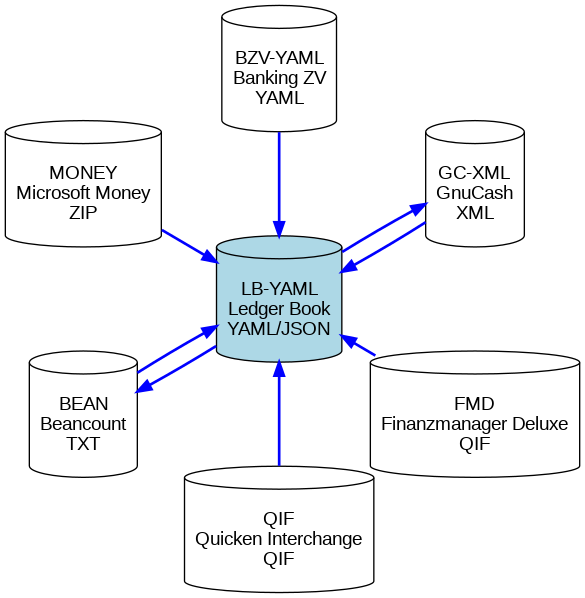
The pyNomina tool follows a '''Hub and Spoke''' model for conversion between different personal accounting file formats. The '''Ledger Book (YAML/JSON)''' format acts as the hub, with each supported format serving as a spoke. This setup simplifies conversions by allowing data to be transformed from any spoke to the hub and then to any other spoke format. | |||
https://diagrams.bitplan.com/render/png/0xa0be5aae.png | |||
=== Supported Formats === | |||
{| class="wikitable" | |||
! Format !! Type !! Description !! Wikidata Entry | |||
|- | |||
| '''Ledger Book YAML/JSON''' || '''Hub''' || Main format of pyNomina for converting between formats. || [https://www.wikidata.org/wiki/Q281876 Ledger Book] | |||
|- | |||
| Beancount || Spoke || A plaintext accounting format. || [https://www.wikidata.org/wiki/Q130456404 Beancount] | |||
|- | |||
| GnuCash XML || Spoke || An XML-based format used by GnuCash. || [https://www.wikidata.org/wiki/Q130445392 GnuCash] | |||
|- | |||
| Microsoft Money || Spoke || Zip File exported with mny_export script using mdb-tools || [https://www.wikidata.org/wiki/Q117428 Microsoft Money] | |||
|- | |||
| Finanzmanager Deluxe (QIF) || Spoke || A variant of QIF used by Finanzmanager Deluxe. || [https://www.wikidata.org/wiki/Q1822341 Finanzmanager Deluxe] | |||
|- | |||
| Quicken Interchange Format || Spoke || Quicken Interchange Format (QIF) || [https://www.wikidata.org/wiki/Q750657 Quicken] | |||
|- | |||
| pyNomina Banking ZV YAML || Spoke || A format for exporting banking data in YAML or JSON. || [https://www.wikidata.org/wiki/Q130438296 Banking ZV] | |||
|} | |||
{{pip|pynomina}} | |||
= Usage = | |||
== command line == | |||
<source lang='bash' highlight='1'> | |||
nomina -h | |||
usage: nomina [-h] [-a] [--apache APACHE] [-c] [-d] | |||
[--debugServer DEBUGSERVER] [--debugPort DEBUGPORT] | |||
[--debugRemotePath DEBUGREMOTEPATH] | |||
[--debugLocalPath DEBUGLOCALPATH] [-l] [-i INPUT] [-rol] | |||
[--host HOST] [--port PORT] [-s] [-V] [-v] [-rp ROOT_PATH] | |||
[--convert CONVERT] [--format {LB-YAML,GC-XML,BEAN}] [-o OUTPUT] | |||
Personal finance tool | |||
options: | |||
-h, --help show this help message and exit | |||
-a, --about show about info [default: False] | |||
--apache APACHE create an apache configuration file for the given | |||
domain | |||
-c, --client start client [default: False] | |||
-d, --debug show debug info [default: False] | |||
--debugServer DEBUGSERVER | |||
remote debug Server | |||
--debugPort DEBUGPORT | |||
remote debug Port | |||
--debugRemotePath DEBUGREMOTEPATH | |||
remote debug Server path mapping - remotePath - path | |||
on debug server | |||
--debugLocalPath DEBUGLOCALPATH | |||
remote debug Server path mapping - localPath - path on | |||
machine where python runs | |||
-l, --local run with local file system access [default: False] | |||
-i INPUT, --input INPUT | |||
input file | |||
-rol, --render_on_load | |||
render on load [default: False] | |||
--host HOST the host to serve / listen from [default: localhost] | |||
--port PORT the port to serve from [default: 9849] | |||
-s, --serve start webserver [default: False] | |||
-V, --version show program's version number and exit | |||
-v, --verbose show verbose output [default: False] | |||
-rp ROOT_PATH, --root_path ROOT_PATH | |||
path to nomina files [default: | |||
/Users/wf/Library/Python/3.12/lib/python/site- | |||
packages/nomina_examples] | |||
--convert CONVERT Convert the specified file to the desired format | |||
--format {LB-YAML,GC-XML,BEAN} | |||
Output format for conversion [default: LB-YAML] | |||
-o OUTPUT, --output OUTPUT | |||
Output file | |||
</source> | |||
== command line conversion == | |||
There is a script test_cmdline that tries out some combinations of input and output file formats. | |||
see also [https://github.com/WolfgangFahl/pynomina/issues/7 Issue 7:command line conversion support] | |||
<source lang='bash' highlight='1'> | |||
scripts/test_cmdline | |||
nomina_examples/empty.yaml → /tmp/nomina/empty_converted.yaml: LB-YAML✅ | |||
nomina_examples/empty.yaml → /tmp/nomina/empty_converted.gnucash: GC-XML✅ | |||
nomina_examples/empty.yaml → /tmp/nomina/empty_converted.beancount: BEAN✅ | |||
... | |||
</source> | |||
== starting as local webapp == | |||
<source lang='bash' highlight='1'> | |||
nomina -s -l | |||
NiceGUI ready to go on http://localhost:9849 | |||
</source> | |||
= Tutorials = | |||
== Quicken == | |||
{{Link|target=Pynomina/Quicken}} | |||
== GnuCash == | |||
{{Link|target=Pynomina/GnuCash}} | |||
== Beancount == | |||
{{Link|target=Pynomina/Beancount}} | |||
== Microsoft Money == | |||
{{Link|target=Pynomina/MsMoney}} | |||
=tickets= | |||
# {{Ticket | |||
|number=19 | |||
|title=add account view | |||
|project=pynomina | |||
|createdAt=2024-10-13 13:22:07+00:00 | |||
|closedAt=2024-10-13 13:22:27+00:00 | |||
|state=closed | |||
}} | |||
# {{Ticket | |||
|number=18 | |||
|title=add a book view | |||
|project=pynomina | |||
|createdAt=2024-10-12 16:52:44+00:00 | |||
|closedAt=2024-10-12 16:53:06+00:00 | |||
|state=closed | |||
}} | |||
# {{Ticket | |||
|number=16 | |||
|title=handle VAT Codes | |||
|project=pynomina | |||
|createdAt=2024-10-12 11:49:11+00:00 | |||
|closedAt= | |||
|state=open | |||
}} | |||
# {{Ticket | |||
|number=15 | |||
|title=enforce beancount account naming | |||
|project=pynomina | |||
|createdAt=2024-10-11 13:07:50+00:00 | |||
|closedAt= | |||
|state=open | |||
}} | |||
# {{Ticket | |||
|number=14 | |||
|title=add calc_balances and remove_unused_accounts function | |||
|project=pynomina | |||
|createdAt=2024-10-10 12:04:44+00:00 | |||
|closedAt=2024-10-10 12:05:49+00:00 | |||
|state=closed | |||
}} | |||
# {{Ticket | |||
|number=12 | |||
|title=add Microsoft Money support | |||
|project=pynomina | |||
|createdAt=2024-10-09 11:43:54+00:00 | |||
|closedAt=2024-10-10 03:49:15+00:00 | |||
|state=closed | |||
}} | |||
# {{Ticket | |||
|number=10 | |||
|title=Beancount conversion problem with expenses2024_bzv example | |||
|project=pynomina | |||
|createdAt=2024-10-09 09:32:22+00:00 | |||
|closedAt=2024-10-11 08:26:00+00:00 | |||
|state=closed | |||
}} | |||
# {{Ticket | |||
|number=9 | |||
|title=file format detection | |||
|project=pynomina | |||
|createdAt=2024-10-08 09:25:56+00:00 | |||
|closedAt=2024-10-08 10:07:27+00:00 | |||
|state=closed | |||
}} | |||
# {{Ticket | |||
|number=8 | |||
|title=Beancount conversion support | |||
|project=pynomina | |||
|createdAt=2024-10-07 06:50:25+00:00 | |||
|closedAt=2024-10-09 09:32:36+00:00 | |||
|state=closed | |||
}} | |||
# {{Ticket | |||
|number=7 | |||
|title=command line conversion support | |||
|project=pynomina | |||
|createdAt=2024-10-06 19:30:37+00:00 | |||
|closedAt=2024-10-09 09:30:53+00:00 | |||
|state=closed | |||
}} | |||
# {{Ticket | |||
|number=6 | |||
|title=Subsembly JSON (BankingZV) export support | |||
|project=pynomina | |||
|createdAt=2024-10-06 19:26:20+00:00 | |||
|closedAt=2024-10-09 09:12:14+00:00 | |||
|state=closed | |||
}} | |||
# {{Ticket | |||
|number=5 | |||
|title=Quicken QIF format support (very simple or Finanzmanager Deluxe Export format for a start ...) | |||
|project=pynomina | |||
|createdAt=2024-10-06 16:50:15+00:00 | |||
|closedAt=2024-10-06 19:25:04+00:00 | |||
|state=closed | |||
}} | |||
# {{Ticket | |||
|number=4 | |||
|title=GnuCash XML support | |||
|project=pynomina | |||
|createdAt=2024-10-06 12:07:54+00:00 | |||
|closedAt=2024-10-06 19:25:23+00:00 | |||
|state=closed | |||
}} | |||
# {{Ticket | |||
|number=3 | |||
|title=Abstract ledger | |||
|project=pynomina | |||
|createdAt=2024-10-06 08:58:56+00:00 | |||
|closedAt=2024-10-06 12:06:15+00:00 | |||
|state=closed | |||
}} | |||
# {{Ticket | |||
|number=2 | |||
|title=setup open checkos compatible opensource project | |||
|project=pynomina | |||
|createdAt=2024-10-06 07:54:51+00:00 | |||
|closedAt=2024-10-06 07:56:35+00:00 | |||
|state=closed | |||
}} | |||
= Testing = | |||
The testcases are python unittest modules see https://github.com/WolfgangFahl/pynomina/tree/main/tests. | |||
These tests are run as part of the [https://github.com/WolfgangFahl/pynomina/blob/main/.github/workflows/build.yml continuous integration github actions] | |||
To run the tests manually there is a "test" script in the scripts directory: | |||
<source lang='bash' highlight='1'> | |||
scripts/test | |||
Starting test test_read_bzv, debug=True ... | |||
# Accounts: 3 | |||
# Transactions: 2 | |||
Date Range: 2024-10-06 to 2024-10-06 | |||
# Categories: 1 | |||
# Currencies: EUR: 2 | |||
Other Details: | |||
name: expenses2024 | |||
owner: John Doe | |||
test test_read_bzv, debug=True took 0.0 s | |||
.Starting test test_conversions, debug=True ... | |||
Converting Ledger Book None to GC-XML | |||
... | |||
Ran 17 tests in 4.518s | |||
OK | |||
</source> | |||
{{:Pynomina/ledger}} | |||
Latest revision as of 09:38, 26 March 2025
OsProject
| OsProject | |
|---|---|
| id | pynomina |
| state | active |
| owner | WolfgangFahl |
| title | pynomina |
| url | https://github.com/WolfgangFahl/pynomina |
| version | 0.0.11 |
| description | personal finance tool |
| date | 2025-03-26 |
| since | 2024-10-06 |
| until | |
Demo
Introduction
pynomina is a personal finance tool designed to provide a flexible and enduring solution for managing financial records from diverse personal accounting tool sources. It aims to address the challenges of data conversion between different accounting software and ensure long-term readability of financial data. There is only limited support for the actual accounting tasks - this can be done much better by existing commercial and open source solutions. pynomina aims to give you the long-term freedom of choice between tools.
Motivation
In the past decades the author used different personal accounting tools:
The pain the conversion between those tools created was finally big enough to do something about it.
Goals
- use a computer and human-readable ledger format that is ready to survive decades
- convert from and to the formats of the tool of choice
- allow for simple sanity checks and reports
- allow for systematic tidy up
- allow for integration into a larger organizational knowledge graph
Hub & Spoke Conversion
The pyNomina tool follows a Hub and Spoke model for conversion between different personal accounting file formats. The Ledger Book (YAML/JSON) format acts as the hub, with each supported format serving as a spoke. This setup simplifies conversions by allowing data to be transformed from any spoke to the hub and then to any other spoke format.
https://diagrams.bitplan.com/render/png/0xa0be5aae.png
Supported Formats
| Format | Type | Description | Wikidata Entry |
|---|---|---|---|
| Ledger Book YAML/JSON | Hub | Main format of pyNomina for converting between formats. | Ledger Book |
| Beancount | Spoke | A plaintext accounting format. | Beancount |
| GnuCash XML | Spoke | An XML-based format used by GnuCash. | GnuCash |
| Microsoft Money | Spoke | Zip File exported with mny_export script using mdb-tools | Microsoft Money |
| Finanzmanager Deluxe (QIF) | Spoke | A variant of QIF used by Finanzmanager Deluxe. | Finanzmanager Deluxe |
| Quicken Interchange Format | Spoke | Quicken Interchange Format (QIF) | Quicken |
| pyNomina Banking ZV YAML | Spoke | A format for exporting banking data in YAML or JSON. | Banking ZV |
Installation
pip install pynomina
# alternatively if your pip is not a python3 pip
pip3 install pynomina
# local install from source directory of pynomina
pip install .
upgrade
pip install pynomina  -U
# alternatively if your pip is not a python3 pip
pip3 install pynomina -U
Usage
command line
nomina -h
usage: nomina [-h] [-a] [--apache APACHE] [-c] [-d]
              [--debugServer DEBUGSERVER] [--debugPort DEBUGPORT]
              [--debugRemotePath DEBUGREMOTEPATH]
              [--debugLocalPath DEBUGLOCALPATH] [-l] [-i INPUT] [-rol]
              [--host HOST] [--port PORT] [-s] [-V] [-v] [-rp ROOT_PATH]
              [--convert CONVERT] [--format {LB-YAML,GC-XML,BEAN}] [-o OUTPUT]

Personal finance tool

options:
  -h, --help            show this help message and exit
  -a, --about           show about info [default: False]
  --apache APACHE       create an apache configuration file for the given
                        domain
  -c, --client          start client [default: False]
  -d, --debug           show debug info [default: False]
  --debugServer DEBUGSERVER
                        remote debug Server
  --debugPort DEBUGPORT
                        remote debug Port
  --debugRemotePath DEBUGREMOTEPATH
                        remote debug Server path mapping - remotePath - path
                        on debug server
  --debugLocalPath DEBUGLOCALPATH
                        remote debug Server path mapping - localPath - path on
                        machine where python runs
  -l, --local           run with local file system access [default: False]
  -i INPUT, --input INPUT
                        input file
  -rol, --render_on_load
                        render on load [default: False]
  --host HOST           the host to serve / listen from [default: localhost]
  --port PORT           the port to serve from [default: 9849]
  -s, --serve           start webserver [default: False]
  -V, --version         show program's version number and exit
  -v, --verbose         show verbose output [default: False]
  -rp ROOT_PATH, --root_path ROOT_PATH
                        path to nomina files [default:
                        /Users/wf/Library/Python/3.12/lib/python/site-
                        packages/nomina_examples]
  --convert CONVERT     Convert the specified file to the desired format
  --format {LB-YAML,GC-XML,BEAN}
                        Output format for conversion [default: LB-YAML]
  -o OUTPUT, --output OUTPUT
                        Output file
command line conversion
There is a script test_cmdline that tries out some combinations of input and output file formats. see also Issue 7:command line conversion support
scripts/test_cmdline
nomina_examples/empty.yaml →  /tmp/nomina/empty_converted.yaml: LB-YAML✅
nomina_examples/empty.yaml →  /tmp/nomina/empty_converted.gnucash: GC-XML✅
nomina_examples/empty.yaml →  /tmp/nomina/empty_converted.beancount: BEAN✅
...
starting as local webapp
nomina -s -l
NiceGUI ready to go on http://localhost:9849
Tutorials
Quicken
GnuCash
Beancount
Microsoft Money
tickets
- Issue 19 - add account view✓
- Issue 18 - add a book view✓
- Issue 16 - handle VAT Codes
- Issue 15 - enforce beancount account naming
- Issue 14 - add calc_balances and remove_unused_accounts function✓
- Issue 12 - add Microsoft Money support✓
- Issue 10 - Beancount conversion problem with expenses2024_bzv example✓
- Issue 9 - file format detection✓
- Issue 8 - Beancount conversion support✓
- Issue 7 - command line conversion support✓
- Issue 6 - Subsembly JSON (BankingZV) export support✓
- Issue 5 - Quicken QIF format support (very simple or Finanzmanager Deluxe Export format for a start ...)✓
- Issue 4 - GnuCash XML support✓
- Issue 3 - Abstract ledger✓
- Issue 2 - setup open checkos compatible opensource project✓
Testing
The testcases are python unittest modules see https://github.com/WolfgangFahl/pynomina/tree/main/tests. These tests are run as part of the continuous integration github actions To run the tests manually there is a "test" script in the scripts directory:
scripts/test
Starting test test_read_bzv, debug=True ...
# Accounts: 3
# Transactions: 2
Date Range: 2024-10-06 to 2024-10-06
# Categories: 1
# Currencies: EUR: 2
Other Details:
  name: expenses2024
  owner: John Doe
test test_read_bzv, debug=True took   0.0 s
.Starting test test_conversions, debug=True ...
Converting Ledger Book None to GC-XML

...
Ran 17 tests in 4.518s

OK
see also https://github.com/WolfgangFahl/pynomina/issues/3
Ledger Book
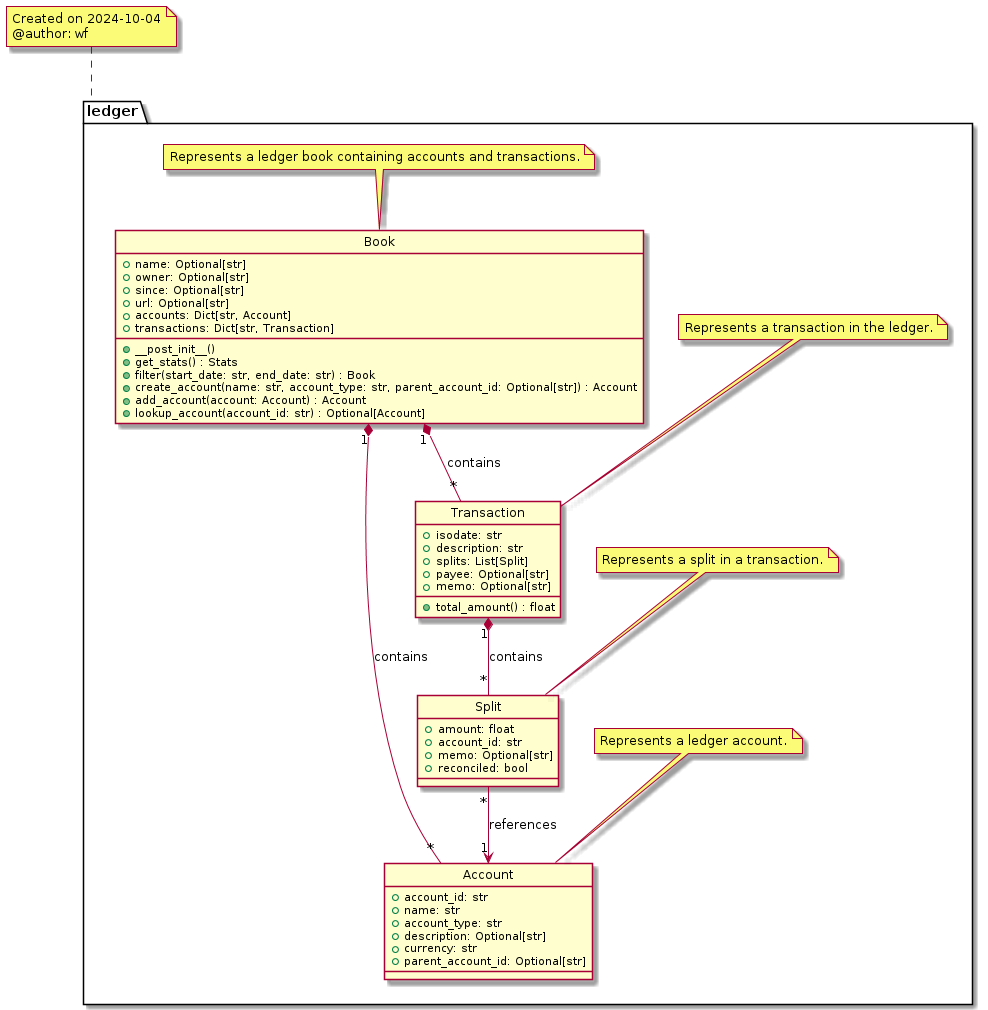
The pynomina Ledger Book model consists of four main classes:
- Book
- Account
- Transaction
- Split
These are the necessary classes which work together to represent a comprehensive financial ledger records.
Class Structure
https://diagrams.bitplan.com/render/png/0xfec2cab6.png
Book
The Book class represents the main container for all financial data. It includes:
- Basic information: name, owner, creation date, and source URL
- Collections of accounts and transactions
- Methods for managing accounts and transactions, including:
- get_stats(): Retrieves statistics about the book
- filter(): Filters transactions by date range
- create_account(): Creates a new account
- add_account(): Adds an account to the book
- lookup_account(): Finds an account by ID
Account
The Account class represents a hierarchy of individual financial accounts within the ledger. It includes:
- account_id: Unique identifier for the account
- name: Human-readable account name
- account_type: Type of account (e.g., EXPENSE, INCOME)
- description: Optional account description
- currency: Account currency (default: EUR)
- parent_account_id: Optional parent account for hierarchical structure
Transaction
The Transaction class represents individual financial transactions. It includes:
- isodate: Date of the transaction in International Standards Organization date format yyyy-mm-dd
- description: Description of the transaction
- splits: List of Split objects representing the movement of money
- payee: Optional payee information
- memo: Optional additional notes
- total_amount(): Method to calculate the total transaction amount
Split
The Split class represents the individual components of a transaction, showing how money moves between accounts. It includes:
- amount: The amount of money involved in the split
- account_id: The account associated with this part of the transaction
- memo: Optional notes for this split
- reconciled: Boolean indicating if the split has been reconciled
Example Data
Here's an example of how the ledger model is used in practice:
Yaml Format
owner: Wolfgang Fahl
url: https://github.com/WolfgangFahl/pynomina/blob/main/nomina_examples/expenses2024.yaml
since: 2024-10-06
accounts:
  Expenses:
    account_id: Expenses
    name: Expenses
    account_type: EXPENSE
    description: 'General Expenses'
    currency: EUR
  Expenses:Food:
    account_id: Expenses:Food
    name: Dining
    account_type: EXPENSE
    description: 'Expenses for Food'
    currency: EUR
    parent_account_id: Expenses
  Cash in wallet:
    account_id: Wallet
    name: Cash in Wallet
    account_type: EXPENSE
    description: ''
    currency: EUR
transactions:
  Bakery2024-10-06_0900_1:
    isodate: '2024-10-06'
    description: Bread
    splits:
      - amount: -3.50
        account_id: Cash in Wallet
      - amount: 3.50
        account_id: Expenses:Dining
        memo: Fresh sourdough bread
  Bakery2024-10-06_0900_2:
    isodate: '2024-10-06'
    description: Buns for Breakfast
    splits:
      - amount: -2.40
        account_id: Cash in Wallet
      - amount: 2.40
        account_id: Expenses:Dining
        memo: 4 whole grain buns
Implementation
The ledger model is implemented in Python, utilizing dataclasses and type hinting for clear and maintainable code. The `@lod_storable` decorator is used to enable easy serialization and deserialization of the data in YAML and/or JSON and other formats. The core idea is that the records should be readily available an tabular "list of dicts (lod)" format.