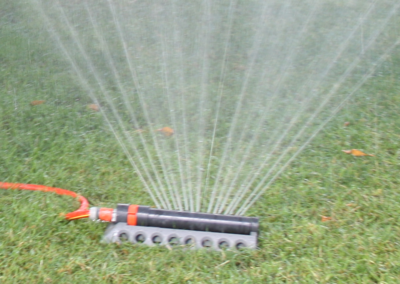
Sprinkler: Difference between revisions
No edit summary |
|||
| (59 intermediate revisions by the same user not shown) | |||
| Line 1: | Line 1: | ||
[[File:sprinkler2018-08-05.png|400px|left|link=Sprinkler/Help]] | |||
= Project = | = Project = | ||
{{OsProject|title=software for sprinkler / water irrigation system based on weather and other parameters |url=https://github.com/BITPlan/com.bitplan.sprinkler|version=0.0.1}} | {{OsProject | ||
|id=com.bitplan.sprinkler | |||
|owner=BITPlan | |||
|title=software for sprinkler control / water irrigation system based on weather and other parameters | |||
|url=https://github.com/BITPlan/com.bitplan.sprinkler | |||
|version=0.0.1 | |||
|date=2018-08-20 | |||
|storemode=property}} | |||
= Manual / Help = | |||
Please go to the {{Link|target=Sprinkler/Help|title=Manual / Help}} page for more details. | |||
= Requirements = | = Requirements = | ||
See also | |||
* https://gardening.stackexchange.com/questions/41255/calculating-amount-of-water-needed-per-day-based-on-weather-and-other-parameters | |||
* [https://github.com/BITPlan/com.bitplan.sprinkler/issues open issues on github] | |||
* [https://github.com/BITPlan/com.bitplan.sprinkler/issues?q=is%3Aissue+is%3Aclosed implemented issues on github] | |||
# The System shall sprinkle if the lawn needs water | # The System shall sprinkle if the lawn needs water | ||
# The System shall sprinkle in the morning no earlier than configured | # The System shall sprinkle in the morning no earlier than configured | ||
# The System shall sprinkle in the evening no later than configured | # The System shall sprinkle in the evening no later than configured | ||
# The System shall sprinkle as often per day as configured | # The System shall sprinkle as often per day as configured | ||
# The System shall collect rain data from a weather service | # The System shall collect rain data from a weather service | ||
## The System shall be able to read weather data from the [https://openweathermap.org/api openweathermap api] | |||
# The System shall operate by simply switching on and off a garden pump at appropriate times | # The System shall operate by simply switching on and off a garden pump at appropriate times | ||
# The System shall determine the amount of irrigation needed based on the weather and the configuration data | # The System shall determine the amount of irrigation needed based on the weather and the configuration data | ||
# An Administrator shall be able to configure the system by setting | # [https://github.com/BITPlan/com.bitplan.sprinkler/issues/1 An Administrator shall be able to configure the system by setting] | ||
## coordinates of the location where the system is operated lon/lat | ## coordinates of the location where the system is operated lon/lat | ||
## l/minute the sprinkler deploys when switched on | ## l/minute the sprinkler deploys when switched on | ||
## earliest time in the morning the system may sprinkle | ## earliest time in the morning the system may sprinkle | ||
## latest time in the | ## latest time in the evening the system may sprinkle | ||
## number of times the system shall sprinkle if needed | ## number of times per day the system shall sprinkle if needed | ||
## size of | ## size of area to being sprinkled | ||
## average l/day beeing evaporated per day by non lawn plants (e.g. trees) | ## average l/day beeing evaporated per day by non lawn plants (e.g. trees) | ||
# A user shall be able to arm/disarm the system | # A user shall be able to arm/disarm the system | ||
# A user shell be able to see the system operation log | # A user shell be able to see the system operation log | ||
# The system operation log shall show the amount of water that has been irrigated as an equivalent mm rain / day and the total liters for the area | # The system operation log shall show the amount of water that has been irrigated as an equivalent mm rain / day and the total liters for the area | ||
# [https://github.com/BITPlan/com.bitplan.sprinkler/issues/2 The system shall read a list of weather locations from the openweather api] | |||
# [https://github.com/BITPlan/com.bitplan.sprinkler/issues/4 The system shall (initially) have a simple command line interface] | |||
= Use cases = | = Use cases = | ||
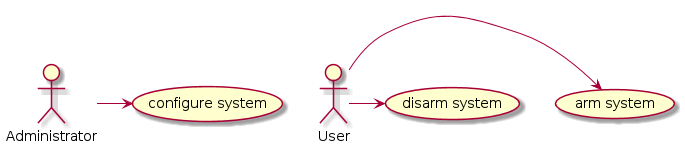
<uml> | |||
Administrator -> (configure system) | |||
User -> (arm system) | |||
User -> (disarm system) | |||
</uml> | |||
== configure system == | |||
As an administrator I'd like to [https://github.com/BITPlan/com.bitplan.sprinkler/issues/1 configure the system]. | |||
== arm / disarm system == | |||
As a user I'd like to arm/disarm the system. | |||
When the system is armed it will automatically sprinkle. If the system is disarmed only manual operation of the sprinkler is possible. | |||
= System context = | = System context = | ||
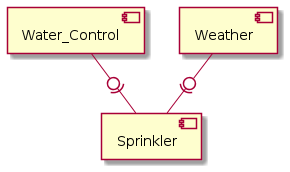
<uml> | <uml> | ||
[Sprinkler] | [Sprinkler] | ||
[ | [Water_Control] | ||
[Weather] | [Weather] | ||
Water_Control -0)- Sprinkler | |||
Weather -0)- Sprinkler | Weather -0)- Sprinkler | ||
</uml> | </uml> | ||
== | == Packages and Classes == | ||
<uml> | <uml> | ||
hide circle | hide circle | ||
package com.bitplan.sprinkler { | package com.bitplan.sprinkler { | ||
class Configuration { | |||
Location location; | Location location; | ||
double lPerMinute; | double lPerMinute; | ||
| Line 50: | Line 74: | ||
double lEvaporationPerDay; | double lEvaporationPerDay; | ||
} | } | ||
class SprinklePeriod { | |||
Date start; | |||
Date stop; | |||
Double mm; | |||
Double kWh; | |||
SprinkleSource source; | |||
} | |||
class SprinkleHistory { | |||
String name; | |||
} | |||
SprinkleHistory -> "sprinklePeriods n" SprinklePeriod | |||
} | |||
package org.openweathermap.weather { | |||
class Location { | |||
long id | |||
String name | |||
String country | |||
{static} Location[] getLocations() | |||
{static} Location byName(String name) | |||
{static} Location byId(long id) | |||
} | |||
class Coord { | |||
double lat | |||
double lon | |||
} | |||
class WeatherReport { | |||
String base; | |||
long id; | |||
long dt; | |||
String name; | |||
long cod; | |||
} | |||
class Clouds { | |||
int all | |||
} | |||
class Main { | |||
double temp; | |||
double pressure; | |||
double humidity; | |||
double temp_min; | |||
double temp_max; | |||
} | |||
class Weather { | |||
String id | |||
String main | |||
String description | |||
String icon | |||
} | |||
class Wind { | |||
double speed; | |||
double deg; | |||
} | |||
class Sys { | |||
String country; | |||
long sunrise; | |||
long sunset; | |||
} | |||
note top of Rain | |||
rain during the last 3 hours | |||
end note | |||
class Rain { | |||
double mm | |||
} | |||
Location->"coord" Coord | |||
WeatherReport -> "weather n" Weather | |||
WeatherReport -> "coord" Coord | |||
WeatherReport -> "clouds" Clouds | |||
WeatherReport -> "main" Main | |||
WeatherReport -> "sys" Sys | |||
WeatherReport -> "rain" Rain | |||
WeatherReport -> "wind" Wind | |||
} | } | ||
Configuration -> "location" Location | |||
</uml> | </uml> | ||
= | = How much and how often? = | ||
* http://www. | <youtube>lt1I3NQqMW0</youtube> | ||
* https:// | <youtube>VB1wxn7H6TM</youtube> | ||
* [https://www.cals.uidaho.edu/edcomm/pdf/CIS/CIS1098.pdf Watering Home Lawns and Landscapes - CIS 1098 - University of Idaho College of Agricultural and Life Sciences] | |||
* [https://www.cals.uidaho.edu/edcomm/pdf/CIS/CIS1157.pdf Watering Home Lawns: How Much and How Often - CIS 1157 - University of Idaho Extension] | |||
* https://bestplants.com/lawn-watering/ | |||
* http://www.greengrassok.com/greengrass-services/how-to-water-your-lawn | |||
== German == | |||
* https://rollrasen.eu/service/rasenpflege/ | |||
* http://www.daserste.de/unterhaltung/quiz-show/wer-weiss-denn-sowas/videos/wer-weiss-denn-sowas-folge-207-rasen-waessern-video-100.html | |||
* https://www.sat1.de/ratgeber/wohnen-garten/gartengestaltung/rasen-bewaessern-wie-oft-und-viel-ihr-gruen-vertraegt | |||
* https://www.mein-schoener-garten.de/gartenpraxis/ziergaerten/rasen-richtig-bewaessern-6651 | |||
* https://www.gartenjournal.net/rasen-sprengen | |||
* https://www.viking.at/schoenthaler-richtiges-bewaessern-Rasen-hochsommerliche-temperaturen.aspx | |||
* https://www.rasen-experte.de/rasen-bewassern-wie-viel-wasser-rasen/ | |||
= Hardware example = | |||
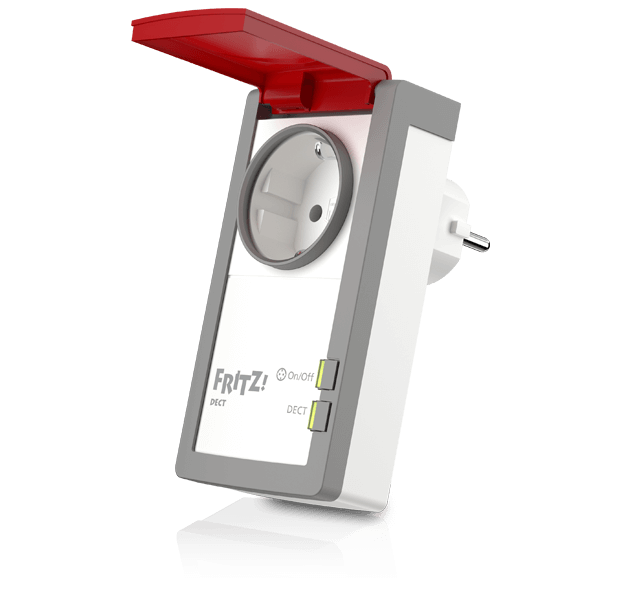
The system assumes that your sprinkler is controllable via a simple power on/power off mechanism. This is true for quite a few | |||
situations where your sprinkler is operated via a garden pump. | |||
== Software controllable power switch == | |||
https://avm.de/fileadmin/user_upload/Global/Produkte/FRITZDECT/210/fritzdect_210_left_de_640x600.png | |||
AVM Fritz DECT 210 | |||
* https://www.amazon.de/AVM-Intelligente-Steckdose-Spritzwasserschutz-Außenbereich/dp/B01MRZ60F0 | |||
= Installation = | |||
Download jar (OS independent) or exe (Windows) file from https://github.com/BITPlan/com.bitplan.sprinkler/tree/master/release | |||
== | == Try it out == | ||
<source lang='bash'> | |||
== | java -jar sprinkler.jar -h | ||
<source lang=' | </source> | ||
should show the available command line parameters | |||
== Rainforecast == | |||
<source lang='bash'> | |||
java -jar sprinkler.jar -rf | |||
2018-08-06 15:00:00 1.62 mm | |||
2018-08-06 18:00:00 3.66 mm | |||
2018-08-06 21:00:00 2.63 mm | |||
2018-08-07 00:00:00 0.32 mm | |||
2018-08-07 03:00:00 0.0 mm | |||
2018-08-07 06:00:00 0.0 mm | |||
2018-08-07 09:00:00 0.0 mm | |||
2018-08-07 12:00:00 0.0 mm | |||
2018-08-07 15:00:00 1.14 mm | |||
2018-08-07 18:00:00 0.31 mm | |||
2018-08-07 21:00:00 0.0 mm | |||
2018-08-08 00:00:00 0.0 mm | |||
2018-08-08 03:00:00 0.38 mm | |||
2018-08-08 06:00:00 1.52 mm | |||
</source> | </source> | ||
= | |||
= Configuration = | |||
A minimal configuration file "default.json" looks like this: | |||
<source lang='json'> | <source lang='json'> | ||
{ | { | ||
"appid": "<insert your openweathermap api key here>", | |||
"location": { "id": 2887186 } | |||
} | } | ||
</source> | </source> | ||
First you might want to [https://openweathermap.org/appid#get get an appid from openweathermap]. | |||
You can find the id of your nearest location with some of the geo calls of the API: https://openweathermap.org/current#geo | |||
== Libraries used == | |||
* {{Link|target=Com.bitplan.javafx}} | |||
== | |||
= | = Icons Attribution = | ||
* | * [[File:85783.svg|128px]] Icon made by Freepik from www.flaticon.com | ||
* [[File:126391.svg|128px]] Icon made by Gregor Cresnar from www.flaticon.com | |||
* [[File:320127.svg|128px]] Icon made by Smashicons from www.flaticon.com | |||
[[Category:frontend]] | |||
* | |||
Latest revision as of 09:21, 20 February 2019
Project
| OsProject | |
|---|---|
 edit edit
| |
| id | com.bitplan.sprinkler |
| state | |
| owner | BITPlan |
| title | software for sprinkler control / water irrigation system based on weather and other parameters |
| url | https://github.com/BITPlan/com.bitplan.sprinkler |
| version | 0.0.1 |
| description | |
| date | 2018-08-20 |
| since | |
| until | |
Manual / Help
Please go to the Manual / Help page for more details.
Requirements
See also
- https://gardening.stackexchange.com/questions/41255/calculating-amount-of-water-needed-per-day-based-on-weather-and-other-parameters
- open issues on github
- implemented issues on github
- The System shall sprinkle if the lawn needs water
- The System shall sprinkle in the morning no earlier than configured
- The System shall sprinkle in the evening no later than configured
- The System shall sprinkle as often per day as configured
- The System shall collect rain data from a weather service
- The System shall be able to read weather data from the openweathermap api
- The System shall operate by simply switching on and off a garden pump at appropriate times
- The System shall determine the amount of irrigation needed based on the weather and the configuration data
- An Administrator shall be able to configure the system by setting
- coordinates of the location where the system is operated lon/lat
- l/minute the sprinkler deploys when switched on
- earliest time in the morning the system may sprinkle
- latest time in the evening the system may sprinkle
- number of times per day the system shall sprinkle if needed
- size of area to being sprinkled
- average l/day beeing evaporated per day by non lawn plants (e.g. trees)
- A user shall be able to arm/disarm the system
- A user shell be able to see the system operation log
- The system operation log shall show the amount of water that has been irrigated as an equivalent mm rain / day and the total liters for the area
- The system shall read a list of weather locations from the openweather api
- The system shall (initially) have a simple command line interface
Use cases
configure system
As an administrator I'd like to configure the system.
arm / disarm system
As a user I'd like to arm/disarm the system. When the system is armed it will automatically sprinkle. If the system is disarmed only manual operation of the sprinkler is possible.
System context
Packages and Classes

How much and how often?
- Watering Home Lawns and Landscapes - CIS 1098 - University of Idaho College of Agricultural and Life Sciences
- Watering Home Lawns: How Much and How Often - CIS 1157 - University of Idaho Extension
- https://bestplants.com/lawn-watering/
- http://www.greengrassok.com/greengrass-services/how-to-water-your-lawn
German
- https://rollrasen.eu/service/rasenpflege/
- http://www.daserste.de/unterhaltung/quiz-show/wer-weiss-denn-sowas/videos/wer-weiss-denn-sowas-folge-207-rasen-waessern-video-100.html
- https://www.sat1.de/ratgeber/wohnen-garten/gartengestaltung/rasen-bewaessern-wie-oft-und-viel-ihr-gruen-vertraegt
- https://www.mein-schoener-garten.de/gartenpraxis/ziergaerten/rasen-richtig-bewaessern-6651
- https://www.gartenjournal.net/rasen-sprengen
- https://www.viking.at/schoenthaler-richtiges-bewaessern-Rasen-hochsommerliche-temperaturen.aspx
- https://www.rasen-experte.de/rasen-bewassern-wie-viel-wasser-rasen/
Hardware example
The system assumes that your sprinkler is controllable via a simple power on/power off mechanism. This is true for quite a few situations where your sprinkler is operated via a garden pump.
Software controllable power switch
https://avm.de/fileadmin/user_upload/Global/Produkte/FRITZDECT/210/fritzdect_210_left_de_640x600.png AVM Fritz DECT 210
Installation
Download jar (OS independent) or exe (Windows) file from https://github.com/BITPlan/com.bitplan.sprinkler/tree/master/release
Try it out
java -jar sprinkler.jar -h
should show the available command line parameters
Rainforecast
java -jar sprinkler.jar -rf
2018-08-06 15:00:00 1.62 mm
2018-08-06 18:00:00 3.66 mm
2018-08-06 21:00:00 2.63 mm
2018-08-07 00:00:00 0.32 mm
2018-08-07 03:00:00 0.0 mm
2018-08-07 06:00:00 0.0 mm
2018-08-07 09:00:00 0.0 mm
2018-08-07 12:00:00 0.0 mm
2018-08-07 15:00:00 1.14 mm
2018-08-07 18:00:00 0.31 mm
2018-08-07 21:00:00 0.0 mm
2018-08-08 00:00:00 0.0 mm
2018-08-08 03:00:00 0.38 mm
2018-08-08 06:00:00 1.52 mm
Configuration
A minimal configuration file "default.json" looks like this:
{
  "appid": "<insert your openweathermap api key here>",
  "location": { "id": 2887186 }
}
First you might want to get an appid from openweathermap. You can find the id of your nearest location with some of the geo calls of the API: https://openweathermap.org/current#geo
Libraries used
Icons Attribution
 Icon made by Freepik from www.flaticon.com
 Icon made by Gregor Cresnar from www.flaticon.com
 Icon made by Smashicons from www.flaticon.com