Pymediawikidocker: Difference between revisions
No edit summary |
|||
| (149 intermediate revisions by the same user not shown) | |||
| Line 3: | Line 3: | ||
{{OsProject | {{OsProject | ||
|id=pymediawikidocker | |id=pymediawikidocker | ||
|state=active | |||
|owner=WolfgangFahl | |owner=WolfgangFahl | ||
|title= | |title=pymediawikidocker | ||
|url=https://github.com/WolfgangFahl/pymediawikidocker | |url=https://github.com/WolfgangFahl/pymediawikidocker | ||
|version=0.5 | |version=0.23.5 | ||
|date= | |description=Python controlled mediawiki docker image installation | ||
|date=2025-12-31 | |||
|since=2021-06-08 | |||
|storemode=property | |storemode=property | ||
}} | }} | ||
=tickets= | |||
= Motivation = | = Motivation = | ||
[https://hub.docker.com/_/mediawiki Official Mediawiki docker images] are available for the different Mediawiki versions. | [https://hub.docker.com/_/mediawiki Official Mediawiki docker images] are available for the different Mediawiki versions. | ||
These images need additional infrastructure to create useable Mediawiki environments. The goal of this project is to semi-automatically create | These images need additional infrastructure to create useable Mediawiki environments. | ||
<source lang='bash'> | |||
docker run --name local-mediawiki -p 8080:80 -d mediawiki | |||
</source> | |||
will only install part of a LAMP environment to install Mediawiki and make it available via http://localhost:8080/. E.g. the database needs to be installed separately. | |||
The goal of this project is to semi-automatically create | |||
such environments and test the functionality. Python was choosen as a development environment for the [https://github.com/WolfgangFahl/pymediawikidocker/blob/main/requirements.txt libraries that are needed and available] to perform the tasks: | such environments and test the functionality. Python was choosen as a development environment for the [https://github.com/WolfgangFahl/pymediawikidocker/blob/main/requirements.txt libraries that are needed and available] to perform the tasks: | ||
* https://github.com/gabrieldemarmiesse/python-on-whales - to automate the docker configuration and start | * https://github.com/gabrieldemarmiesse/python-on-whales - to automate the docker configuration and start | ||
| Line 23: | Line 34: | ||
= How it works = | = How it works = | ||
The core concept is a "MediawikiCluster" that is a set of docker applications that run MediaWiki instances with varying versions of MediaWiki and the underlying database. | The core concept is a "MediawikiCluster" that is a set of docker applications that run MediaWiki instances with varying versions of MediaWiki and the underlying database. | ||
The graphic belows shows the docker containers which are created for different versions of Mediawiki | |||
<graphviz> | <graphviz> | ||
// generated by /Users/wf/ | // generated by /Users/wf/py-workspace/pymediawikidocker/tests/test_install.py on 2025-12-18T13:50:37.140871 | ||
digraph mwcluster { | digraph mwcluster { | ||
mew0 [ label=" | rankdir="RL" | ||
mdb0 [ label=" | mew0 [ label="mw-135-mw\nMediaWiki 1.35.13\nport 9080" ] | ||
mdb0 [ label="mw-135-db\nMariaDB 11.8\nport 9306" ] | |||
subgraph cluster_0{ | subgraph cluster_0{ | ||
label=" | label="mw-135" | ||
mew0->mdb0 | mew0->mdb0 | ||
} | } | ||
mew1 [ label=" | mew1 [ label="mw-139-mw\nMediaWiki 1.39.17\nport 9081" ] | ||
mdb1 [ label=" | mdb1 [ label="mw-139-db\nMariaDB 11.8\nport 9307" ] | ||
subgraph cluster_1{ | subgraph cluster_1{ | ||
label=" | label="mw-139" | ||
mew1->mdb1 | mew1->mdb1 | ||
} | } | ||
mew2 [ label=" | mew2 [ label="mw-143-mw\nMediaWiki 1.43.6\nport 9082" ] | ||
mdb2 [ label=" | mdb2 [ label="mw-143-db\nMariaDB 11.8\nport 9308" ] | ||
subgraph cluster_2{ | subgraph cluster_2{ | ||
label=" | label="mw-143" | ||
mew2->mdb2 | mew2->mdb2 | ||
} | } | ||
mew3 [ label=" | mew3 [ label="mw-144-mw\nMediaWiki 1.44.3\nport 9083" ] | ||
mdb3 [ label=" | mdb3 [ label="mw-144-db\nMariaDB 11.8\nport 9309" ] | ||
subgraph cluster_3{ | subgraph cluster_3{ | ||
label=" | label="mw-144" | ||
mew3->mdb3 | mew3->mdb3 | ||
} | } | ||
mew4 [ label=" | mew4 [ label="mw-145-mw\nMediaWiki 1.45.1\nport 9084" ] | ||
mdb4 [ label=" | mdb4 [ label="mw-145-db\nMariaDB 11.8\nport 9310" ] | ||
subgraph cluster_4{ | subgraph cluster_4{ | ||
label=" | label="mw-145" | ||
mew4->mdb4 | mew4->mdb4 | ||
} | } | ||
| Line 63: | Line 76: | ||
== Prerequisites == | == Prerequisites == | ||
Docker on Windows, Mac or Linux suppporting "docker compose up" using the Docker composer V2 CLI | Docker on Windows, Mac or Linux suppporting "docker compose up" using the Docker composer V2 CLI | ||
=== Ubuntu | === Ubuntu 24.04 LTS installation === | ||
see https://docs.docker.com/engine/install/ubuntu/ on how to setup the docker | see https://docs.docker.com/engine/install/ubuntu/ on how to setup the docker repository | ||
<source lang='bash' highlight='1- | |||
<source lang='bash' highlight='1-12,15,17-18'> | |||
sudo apt-get install ca-certificates curl gnupg | |||
sudo install -m 0755 -d /etc/apt/keyrings | |||
curl -fsSL https://download.docker.com/linux/ubuntu/gpg | \ | |||
sudo gpg --dearmor -o /etc/apt/keyrings/docker.gpg | |||
sudo chmod a+r /etc/apt/keyrings/docker.gpg | |||
echo \ | |||
"deb [arch=$(dpkg --print-architecture) signed-by=/etc/apt/keyrings/docker.gpg] \ | |||
https://download.docker.com/linux/ubuntu noble stable" | \ | |||
sudo tee /etc/apt/sources.list.d/docker.list > /dev/null | |||
sudo apt-get update | |||
sudo apt-get install docker-ce docker-ce-cli containerd.io docker-compose-plugin | sudo apt-get install docker-ce docker-ce-cli containerd.io docker-compose-plugin | ||
docker --version | docker --version | ||
Docker version 29.0.2, build 8108357 | |||
# Create the docker group if it does not exist | |||
sudo groupadd docker 2>/dev/null || true | |||
# Add your current user to the docker group | |||
sudo usermod -aG docker "$USER" | |||
docker run hello-world | docker run hello-world | ||
Docker | Hello from Docker! | ||
</source> | </source> | ||
The <nowiki>"Hello from Docker"</nowiki> message shows that your installation appears to be working correctly. | |||
=== Compatibility test === | === Compatibility test === | ||
| Line 77: | Line 107: | ||
docker 2>&1 | grep compose | docker 2>&1 | grep compose | ||
compose* Docker Compose (Docker Inc., v2.4.1) | compose* Docker Compose (Docker Inc., v2.4.1) | ||
# test on an Ubuntu machine | # test on an Ubuntu machine 2023-04-07 | ||
docker 2>&1 | grep compose | docker 2>&1 | grep compose | ||
compose* Docker Compose (Docker Inc., v2.17.2) | |||
</source> | </source> | ||
=== | === Test of docker compose === | ||
<source lang='bash' highlight='1'> | <source lang='bash' highlight='1'> | ||
No LSB modules are available. | No LSB modules are available. | ||
Distributor ID: Ubuntu | Distributor ID: Ubuntu | ||
Description: Ubuntu | Description: Ubuntu 24.04.3 LTS | ||
Release: | Release: 24.04 | ||
Codename: | Codename: noble | ||
</source> | </source> | ||
==== docker compose (not docker-compose) ==== | |||
===== Ubuntu 22.04/24.04 LTS ===== | |||
<source lang='bash' highlight='1'> | <source lang='bash' highlight='1'> | ||
docker compose version | docker compose version | ||
Docker Compose version | Docker Compose version v5.0.0 | ||
</source> | </source> | ||
<source lang='bash' highlight='1 | |||
===== macOs / ORBStack ===== | |||
docker | <source lang='bash' highlight='1'> | ||
docker compose version | |||
Docker Compose version v2.40.3 | |||
</source> | </source> | ||
| Line 121: | Line 149: | ||
<source lang='bash' highlight='1'> | <source lang='bash' highlight='1'> | ||
mwcluster -V | mwcluster -V | ||
pymediawikidocker 0.23.2 2025-12-18 | |||
</source> | </source> | ||
| Line 127: | Line 155: | ||
<source lang='bash' highlight='1'> | <source lang='bash' highlight='1'> | ||
mwcluster -h | mwcluster -h | ||
usage: | usage: mwcluster [-h] [-a] [-d] [--debugLocalPath DEBUGLOCALPATH] [--debugPort DEBUGPORT] | ||
[--debugRemotePath DEBUGREMOTEPATH] [--debugServer DEBUGSERVER] [-f] [-q] [-v] | |||
[-V] [--article_path ARTICLE_PATH] [-bm] [-cn CONTAINER_NAME] | |||
[-sp | [-dcn DB_CONTAINER_NAME] [-el [EXTENSIONNAMELIST ...]] [-ej EXTENSIONJSONFILE] | ||
[-vl [VERSIONS ...]] [- | [--forceRebuild] [-fu] [--host HOST] [-dp DOCKER_PATH] [--lenient] [--logo LOGO] | ||
[-mv MARIADBVERSION] [--mysqlRootPassword MYSQLROOTPASSWORD] | |||
[--mysqlPassword MYSQLPASSWORD] [-rp] [-p PASSWORD] [-pl PASSWORD_LENGTH] | |||
[--prefix PREFIX] [--prot PROT] [--script_path SCRIPT_PATH] [--url URL] | |||
[-sp SQL_PORT] [-smw SMW_VERSION] [-u USER] [--uid UID] [--gid GID] | |||
[-bp BASE_PORT] [-vl [VERSIONS ...]] [--create] [--down] [--check] [--list] | |||
Python controlled (semantic) mediawiki docker application cluster installation | |||
options: | options: | ||
-h, --help show this help message and exit | -h, --help show this help message and exit | ||
- | -a, --about show version info and open documentation | ||
-d, --debug enable debug output | |||
--debugLocalPath DEBUGLOCALPATH | |||
- | remote debug Server path mapping - localPath - path on machine where | ||
python runs | |||
--debugPort DEBUGPORT | |||
remote debug Port [default: 5678] | |||
--debugRemotePath DEBUGREMOTEPATH | |||
remote debug Server path mapping - remotePath - path on debug server | |||
--debugServer DEBUGSERVER | |||
remote debug Server | |||
-f, --force force overwrite or unsafe actions | |||
-q, --quiet suppress all output | |||
-v, --verbose increase output verbosity | |||
-V, --version show program's version number and exit | |||
--article_path ARTICLE_PATH | |||
change to any article_path you might need to set [default: ] | |||
-bm, --bind-mount use bind mounts instead of volumes | |||
-cn CONTAINER_NAME, --container_name CONTAINER_NAME | -cn CONTAINER_NAME, --container_name CONTAINER_NAME | ||
set container name (only valid and recommended for | set container name (only valid and recommended for single version call) | ||
-dcn DB_CONTAINER_NAME, --db_container_name DB_CONTAINER_NAME | |||
- | set database container name [default: None] | ||
-el [EXTENSIONNAMELIST ...], --extensionList [EXTENSIONNAMELIST ...] | -el [EXTENSIONNAMELIST ...], --extensionList [EXTENSIONNAMELIST ...] | ||
list of extensions to be installed [default: ['Admin | list of extensions to be installed [default: ['Admin Links', 'Header | ||
Tabs', 'ParserFunctions', 'SyntaxHighlight', 'Variables']] | |||
-ej EXTENSIONJSONFILE, --extensionJson EXTENSIONJSONFILE | -ej EXTENSIONJSONFILE, --extensionJson EXTENSIONJSONFILE | ||
additional extension descriptions default: None | additional extension descriptions default: [default: None] | ||
--forceRebuild force rebuilding [default: False] | |||
- | -fu, --force_user force overwrite of wikiuser | ||
and | --host HOST the host to serve / listen from [default: fur] | ||
--logo LOGO set Logo [default: | -dp DOCKER_PATH, --docker_path DOCKER_PATH | ||
the base directory to store docker and jinja template files [default: | |||
/home/wf/.pymediawikidocker] | |||
--lenient do not throw error on wikiuser difference | |||
--logo LOGO set Logo [default: $wgResourceBasePath/resources/assets/wiki.png] | |||
-mv MARIADBVERSION, --mariaDBVersion MARIADBVERSION | -mv MARIADBVERSION, --mariaDBVersion MARIADBVERSION | ||
mariaDB Version to be installed [default: | mariaDB Version to be installed [default: 11.8] | ||
--mysqlRootPassword MYSQLROOTPASSWORD | |||
set sql root Password [default: None] - random password if None | |||
--mysqlPassword MYSQLPASSWORD | |||
set sql user Password [default: None] - random password if None | |||
-rp, --random_password | |||
create random password and create wikiuser while at it | |||
-p PASSWORD, --password PASSWORD | -p PASSWORD, --password PASSWORD | ||
set password for initial user [default: sysop-1234!] | set password for initial user [default: sysop-1234!] | ||
-sp | -pl PASSWORD_LENGTH, --password_length PASSWORD_LENGTH | ||
set base mySql port 3306 to be exposed - incrementing | set the password length for random passwords[default: 15] | ||
--prefix PREFIX the container name prefix to use [default: mw] | |||
-smw | --prot PROT change to https in case [default: http] | ||
set SemanticMediaWiki Version to be installed default | --script_path SCRIPT_PATH | ||
change to any script_path you might need to set [default: ] | |||
-u USER, --user USER set username of initial user with sysop rights | --url URL will set prot host,script_path, and optionally port based on the url given | ||
[default: None] | |||
- | -sp SQL_PORT, --sql_base_port SQL_PORT | ||
-vl [VERSIONS ...], -- | set base mySql port 3306 to be exposed - incrementing by one for each | ||
mediawiki versions to create docker applications for | version [default: 9306] | ||
-smw SMW_VERSION, --smw_version SMW_VERSION | |||
set SemanticMediaWiki Version to be installed default is None - no | |||
- | installation of SMW | ||
-u USER, --user USER set username of initial user with sysop rights [default: Sysop] | |||
--uid UID User ID (default: 33 for www-data) | |||
--gid GID Group ID (default: 33 for www-data) | |||
-bp BASE_PORT, --base_port BASE_PORT | |||
set how base html port 80 to be exposed - incrementing by one for each | |||
version [default: 9080] | |||
-vl [VERSIONS ...], --version_list [VERSIONS ...] | |||
mediawiki versions to create docker applications for [default: ['1.35.13', | |||
'1.39.17', '1.43.6', '1.44.3', '1.45.1']] | |||
--create | |||
--down | |||
--check | |||
--list | |||
</source> | </source> | ||
= Examples = | = Examples = | ||
{{Link|target=Pymediawikidocker_example_2022-10-26}} | |||
== | == create with default settings == | ||
Starts a cluster with versions 1. | Starts a cluster with versions 1.35.13,1.39.13, 1.43.2, and 1.44.0 using MariaDB 10.11. | ||
<source lang='bash' highlight=' | Essentially this is automatic generation of the configuration with a docker compose up for all versions asked for. | ||
mwcluster -f | <source lang='bash' highlight='2'> | ||
# force new user and random password | |||
mwcluster --create -f -fu -rp | |||
starting mw-135 1.35.13 docker application ... | |||
... | |||
starting mw-139 1.39.15 docker application ... | |||
... | |||
starting mw-143 1.43.5 docker application ... | |||
... | |||
starting mw-144 1.44.2 docker application ... | |||
✔ Network mw-144_default Created 0.1s | |||
✔ Volume mw-144_mysql-data Created 0.0s | |||
✔ Volume mw-144_wiki-sites Created 0.0s | |||
✔ Volume mw-144_wiki-etc Created 0.0s | |||
✔ Volume mw-144_wiki-html Created 0.0s | |||
✔ Container mw-144-db Started 5.4s | |||
✔ Container mw-144-mw Started 4.1s | |||
mw-144-mw 🟢 started in 0.01s | |||
mw-144-db 🟢 started in 0.01s | |||
Initializing MediaWiki SQL tables ... | |||
... | ... | ||
Starting periodic command scheduler: cron. | |||
MediaWiki setup complete! | |||
MediaWiki mw-144 is ready at ... | |||
</source> | </source> | ||
Mediawiki applications will be available at | Mediawiki applications will be available at | ||
| Line 200: | Line 279: | ||
# {{mwlink|port=9082}} | # {{mwlink|port=9082}} | ||
# {{mwlink|port=9083}} | # {{mwlink|port=9083}} | ||
=== check === | === check === | ||
<source lang='bash' highlight='1'> | <source lang='bash' highlight='1'> | ||
mwcluster - | mwcluster --check -f | ||
1:checking 1.35.13 ... | |||
mediawiki webserver container mw-135-mw:✅ | |||
mediawiki database container mw-135-db:✅ | |||
mediawiki webserver container | |||
mediawiki database container | |||
port binding 9080= expected port 9080?:✅ | port binding 9080= expected port 9080?:✅ | ||
Checking http:// | Checking http://fur:9080/index.php?title=Special:Version ... | ||
Special Version accessible ...:✅ | Special Version accessible ...:✅ | ||
Mediawiki Version 1. | Mediawiki Version 1.35.13= expected 1.35.13?:✅ | ||
Maria DB Version | Maria DB Version 11.8 fitting expected 11.8?:✅ | ||
2:checking 1.39.17 ... | |||
mediawiki webserver container | mediawiki webserver container mw-139-mw:✅ | ||
mediawiki database container | mediawiki database container mw-139-db:✅ | ||
port binding 9081= expected port 9081?:✅ | port binding 9081= expected port 9081?:✅ | ||
Checking http:// | Checking http://fur:9081/index.php?title=Special:Version ... | ||
Special Version accessible ...:✅ | Special Version accessible ...:✅ | ||
Mediawiki Version 1. | Mediawiki Version 1.39.17= expected 1.39.17?:✅ | ||
Maria DB Version | Maria DB Version 11.8 fitting expected 11.8?:✅ | ||
3:checking 1.43.6 ... | |||
mediawiki webserver container | mediawiki webserver container mw-143-mw:✅ | ||
mediawiki database container | mediawiki database container mw-143-db:✅ | ||
port binding 9082= expected port 9082?:✅ | port binding 9082= expected port 9082?:✅ | ||
Checking http:// | Checking http://fur:9082/index.php?title=Special:Version ... | ||
Special Version accessible ...:✅ | Special Version accessible ...:✅ | ||
Mediawiki Version 1. | Mediawiki Version 1.43.6= expected 1.43.6?:✅ | ||
Maria DB Version | Maria DB Version 11.8 fitting expected 11.8?:✅ | ||
4:checking 1.44.3 ... | |||
mediawiki webserver container | mediawiki webserver container mw-144-mw:✅ | ||
mediawiki database container | mediawiki database container mw-144-db:✅ | ||
port binding 9083= expected port 9083?:✅ | port binding 9083= expected port 9083?:✅ | ||
Checking http:// | Checking http://fur:9083/index.php?title=Special:Version ... | ||
Special Version accessible ...:✅ | Special Version accessible ...:✅ | ||
Mediawiki Version 1. | Mediawiki Version 1.44.3= expected 1.44.3?:✅ | ||
Maria DB Version | Maria DB Version 11.8 fitting expected 11.8?:✅ | ||
5:checking 1.45.1 ... | |||
mediawiki webserver container | mediawiki webserver container mw-145-mw:✅ | ||
mediawiki database container | mediawiki database container mw-145-db:✅ | ||
port binding 9084= expected port 9084?:✅ | port binding 9084= expected port 9084?:✅ | ||
Checking http:// | Checking http://fur:9084/index.php?title=Special:Version ... | ||
Special Version accessible ...:✅ | Special Version accessible ...:✅ | ||
Mediawiki Version 1. | Mediawiki Version 1.45.1= expected 1.45.1?:✅ | ||
Maria DB Version | Maria DB Version 11.8 fitting expected 11.8?:✅ | ||
</source> | |||
== down == | |||
<source lang='bash' highlight='1'> | |||
mwcluster --down -f | |||
running docker compose down for mw-135 1.35.13 docker application ... | |||
[+] down 7/7 | |||
✔ Container mw-135-mw Removed 1.3s | |||
✔ Container mw-135-db Removed 0.6s | |||
✔ Volume mw-135_wiki-etc Removed 0.0s | |||
✔ Volume mw-135_wiki-sites Removed 0.0s | |||
✔ Volume mw-135_wiki-html Removed 0.5s | |||
✔ Volume mw-135_mysql-data Removed 0.6s | |||
running docker compose down for mw-139 1.39.17 docker application ... 0.2s | |||
[+] down 7/7 | |||
✔ Container mw-139-mw Removed 1.4s | |||
✔ Container mw-139-db Removed 0.7s | |||
✔ Volume mw-139_wiki-sites Removed 0.0s | |||
✔ Volume mw-139_mysql-data Removed 0.6s | |||
✔ Volume mw-139_wiki-html Removed 0.6s | |||
✔ Volume mw-139_wiki-etc Removed 0.6s | |||
✔ Network mw-139_mediawiki-net Removed 0.2s | |||
running docker compose down for mw-143 1.43.6 docker application ... | |||
[+] down 7/7 | |||
✔ Container mw-143-mw Removed 1.4s | |||
✔ Container mw-143-db Removed 0.6s | |||
✔ Volume mw-143_mysql-data Removed 0.0s | |||
✔ Volume mw-143_wiki-etc Removed 0.1s | |||
✔ Volume mw-143_wiki-html Removed 0.7s | |||
✔ Volume mw-143_wiki-sites Removed 0.7s | |||
✔ Network mw-143_mediawiki-net Removed 0.2s | |||
running docker compose down for mw-144 1.44.3 docker application ... | |||
[+] down 5/7 | |||
✔ Container mw-144-mw Removed 2.8s | |||
✔ Container mw-144-db Removed 0.9s | |||
✔ Volume mw-144_wiki-etc Removed 0.0s | |||
✔ Volume mw-144_mysql-data Removed 0.1s | |||
✔ Network mw-144_mediawiki-net Removed 0.1s | |||
⠦ Volume mw-144_wiki-html Removing 0.7s | |||
⠦ Volume mw-144_wiki-sites Removing 0.7s | |||
running docker compose down for mw-145 1.45.1 docker application ... | |||
[+] down 7/7 | |||
✔ Container mw-145-mw Removed 1.8s | |||
✔ Container mw-145-db Removed 0.6s | |||
✔ Volume mw-145_wiki-etc Removed 0.0s | |||
✔ Volume mw-145_wiki-html Removed 0.8s | |||
✔ Volume mw-145_wiki-sites Removed 0.0s | |||
✔ Volume mw-145_mysql-data Removed 0.0s | |||
✔ Network mw-145_mediawiki-net Removed 0.2s | |||
</source> | </source> | ||
== Single 1. | == Single 1.39.15 LTS == | ||
<source lang='bash' highlight="2"> | <source lang='bash' highlight="2"> | ||
# python mwdocker/mwcluster.py can be used instead of mwcluster if you test from your locally cloned environment | # python mwdocker/mwcluster.py can be used instead of mwcluster if you test from your locally cloned environment | ||
mwcluster \ | mwcluster \ | ||
--create \ | |||
--forceRebuild\ | --forceRebuild\ | ||
-- | --version_list 1.39.17\ | ||
-- | --base_port 8480\ | ||
-- | --sql_base_port 10308\ | ||
--mariaDBVersion | --mariaDBVersion 11.8\ | ||
--container_name | --container_name mw139lts\ | ||
--logo https://upload.wikimedia.org/wikipedia/commons/thumb/f/f9/Bigsmile_smiley_yellow_simple.svg/128px-Bigsmile_smiley_yellow_simple.svg.png | --logo https://upload.wikimedia.org/wikipedia/commons/thumb/f/f9/Bigsmile_smiley_yellow_simple.svg/128px-Bigsmile_smiley_yellow_simple.svg.png | ||
creating docker compose applications for mediawiki versions ['1.39.10'] | |||
starting mw139lts 1.39.17 docker application ... | |||
</source> | </source> | ||
Mediawiki application will be available at | Mediawiki application will be available at | ||
| Line 265: | Line 393: | ||
[[File:pyMediaWikiDocker-ExampleMW135WithLogo.png|600px]] | [[File:pyMediaWikiDocker-ExampleMW135WithLogo.png|600px]] | ||
== Single 1.35 with Semantic Mediawiki == | == Single 1.35 with Semantic Mediawiki - deprecated == | ||
There might be more current versions of SMW available see https://www.semantic-mediawiki.org/wiki/Semantic_MediaWiki_Version_History and adapt | |||
the example below if you see the need to do so. | |||
=== Version 4.1.2 === | |||
<source lang='bash' highlight='1-9'> | <source lang='bash' highlight='1-9'> | ||
mwcluster \ | mwcluster \ | ||
--container_name | --create \ | ||
--container_name smw4\ | |||
--forceRebuild\ | --forceRebuild\ | ||
-- | --version_list 1.35.13\ | ||
-- | --base_port 8481\ | ||
-- | --sql_base_port 10307\ | ||
--mariaDBVersion 10. | --mariaDBVersion 10.11\ | ||
-- | --smw_version 4.1.2 | ||
creating docker compose applications for mediawiki versions ['1.35.13'] | |||
starting smw4 1.35.13 docker application ... | |||
</source> | </source> | ||
=== debug docker compose results - ports and other configuration parts === | ==== debug docker compose results - ports and other configuration parts ==== | ||
<source lang='bash' highlight='1-2,4'> | <source lang='bash' highlight='1-2,4'> | ||
cd ~/.pymediawikidocker/ | cd ~/.pymediawikidocker/smw4 | ||
docker-compose up | docker-compose up | ||
# in another terminal session: | # in another terminal session: | ||
docker ps | docker ps | ||
CONTAINER ID IMAGE | CONTAINER ID IMAGE COMMAND CREATED STATUS PORTS NAMES | ||
87a795d444eb smw4_mw "docker-php-entrypoi…" About a minute ago Up 7 seconds 0.0.0.0:8481->80/tcp smw4-mw | |||
7ca3a0434d31 mariadb:10.11 "docker-entrypoint.s…" About a minute ago Up 7 seconds 0.0.0.0:10307->3306/tcp smw4-db | |||
</source> | </source> | ||
==== open bash in docker container ==== | ==== open bash in docker container ==== | ||
<source lang='bash' highlight='1'> | <source lang='bash' highlight='1'> | ||
docker exec -it | docker exec -it smw4-mw /bin/bash | ||
root@87a795d444eb:/var/www/html# | |||
</source> | </source> | ||
'''check installExtensions.sh script''' | '''check installExtensions.sh script''' | ||
<source lang='bash' highlight='1'> | <source lang='bash' highlight='1'> | ||
cat / | cat /root/installExtensions.sh | ||
#!/bin/bash | #!/bin/bash | ||
# install the required extensions | # install the required extensions | ||
| Line 322: | Line 455: | ||
# enable Support for Semantic MediaWiki | # enable Support for Semantic MediaWiki | ||
# see https://www.semantic-mediawiki.org/wiki/Help:EnableSemantics | # see https://www.semantic-mediawiki.org/wiki/Help:EnableSemantics | ||
# Version of SemanticMediaWiki at install time: 4. | # Version of SemanticMediaWiki at install time: 4.1.1 | ||
wfLoadExtension( 'SemanticMediaWiki' ); | wfLoadExtension( 'SemanticMediaWiki' ); | ||
enableSemantics(); | enableSemantics(); | ||
# https://www.semantic-mediawiki.org/wiki/Help:$smwgQMaxInlineLimit | |||
</source> | |||
=== SMW Version 3.2.3 === | |||
==== Installation ==== | |||
<source lang='bash' highlight='1-10'> | |||
mwcluster \ | |||
--create \ | |||
--container_name smw3\ | |||
--forceRebuild\ | |||
--version_list 1.35.13\ | |||
--base_port 8482\ | |||
--sql_base_port 10308\ | |||
--mariaDBVersion 10.11\ | |||
--logo https://www.semantic-mediawiki.org/w/images/4/4e/SMW_logo_180.png\ | |||
--smw_version 3.2.3 | |||
</source> | |||
==== Check ==== | |||
<source lang='bash' highlight='1'> | |||
mwcluster --check --container_name smw3 --version_list 1.35.13 | |||
</source> | |||
==== Down ==== | |||
<source lang='bash' highlight='1'> | |||
mwcluster --down --container_name smw3 --version_list 1.35.13 -f | |||
running docker compose down for mediawiki versions ['1.35.13'] | |||
running docker compose down for smw3 1.35.10 docker application ... | |||
[+] Running 3/3 | |||
⠿ Volume smw3_wiki-etc Removed 0.0s | |||
⠿ Volume smw3_mysql-data Removed 0.1s | |||
⠿ Volume smw3_wiki-www Removed 1.2s | |||
</source> | </source> | ||
| Line 334: | Line 498: | ||
<source lang='bash' higlight="1-3"> | <source lang='bash' higlight="1-3"> | ||
pwd | pwd | ||
/Users/***/.pymediawikidocker/ | /Users/***/.pymediawikidocker/mw-139 | ||
ls -l | ls -l | ||
total | total 128 | ||
-rw-r-- | -rwxrwxr-x 1 wf wf 349 Nov 18 12:40 addSysopUser.sh | ||
-rw- | -rw-rw-r-- 1 wf wf 23 Nov 18 12:40 composer.local.json | ||
-rw-r-- | -rwxrwxr-x 1 wf wf 465 Nov 18 12:40 disable_sudo.sh | ||
-rw-r--r-- | -rw-rw-r-- 1 wf wf 1952 Nov 18 12:40 docker-compose.yml | ||
-rw-r-- | -rw-rw-r-- 1 wf wf 1410 Nov 18 12:40 Dockerfile | ||
-rw-r--r-- | -rwxrwxr-x 1 wf wf 153 Nov 18 12:40 install_djvu.sh | ||
-rwxrwxr-x 1 wf wf 1378 Nov 18 12:40 installExtensions.sh | |||
-rw-rw-r-- 1 wf wf 6905 Nov 18 12:40 LocalSettings.php | |||
-rw-rw-r-- 1 wf wf 1059 Nov 18 12:40 MwConfig.json | |||
-rw-rw-r-- 1 wf wf 267 Nov 18 12:40 phpinfo.php | |||
-rwxrwxr-x 1 wf wf 2339 Nov 18 12:40 plantuml.sh | |||
-rwxrwxr-x 1 wf wf 10491 Nov 18 12:40 setup-mediawiki.sh | |||
-rw-rw-r-- 1 wf wf 206 Nov 18 12:40 upload.ini | |||
-rw-rw-r-- 1 wf wf 64482 Nov 18 12:40 wiki.sql | |||
</source> | </source> | ||
== Check installed docker images == | == Check installed docker images == | ||
<source lang='bash' highlight='1'> | <source lang='bash' highlight='1'> | ||
docker images | grep mw | docker images | grep mw | ||
WARNING: This output is designed for human readability. For machine-readable output, please use --format. | |||
mw-135-mw:latest f4fac7e4ab24 1.58GB 347MB U | |||
mw-139-mw:latest 998a1c08c2f0 1.9GB 411MB U | |||
mw-143-mw:latest 12f3e2ba4d4a 2.1GB 458MB U | |||
mw-144-mw:latest 4a6a421be704 2.13GB 462MB U | |||
mw139-10lts-mw:latest 35aa59eb9dd2 1.9GB 411MB U | |||
mw139-11lts-mw:latest 71b736a6acff 1.9GB 411MB | |||
mw139lts-mw:latest 8e83e31a47e1 1.9GB 411MB U | |||
smw4-mw:latest 10a6e1911648 1.9GB 411MB U | |||
</source> | </source> | ||
== Bash into docker containers == | == Bash into docker containers == | ||
<source lang="bash" highlight='2-5,8-11'> | |||
<source lang= | |||
# Mediawiki container | # Mediawiki container | ||
docker exec -it | docker exec -it mw-144-mw /bin/bash | ||
docker exec -it | docker exec -it mw-143-mw /bin/bash | ||
docker exec -it | docker exec -it mw-139-mw /bin/bash | ||
docker exec -it | docker exec -it mw-135-mw /bin/bash | ||
# MariaDB container | # MariaDB container | ||
docker exec -it | docker exec -it mw-144-db /bin/bash | ||
docker exec -it | docker exec -it mw-143-db /bin/bash | ||
docker exec -it | docker exec -it mw-139-db /bin/bash | ||
docker exec -it | docker exec -it mw-135-db /bin/bash | ||
</source> | |||
</source> | </source> | ||
| Line 396: | Line 572: | ||
docker cp mw1_36_0_db_1:/tmp/wiki.sql /tmp | docker cp mw1_36_0_db_1:/tmp/wiki.sql /tmp | ||
</source> | </source> | ||
== | == Docker cleanup procedure == | ||
<source lang='bash'> | <source lang='bash'> | ||
#!/bin/bash | |||
# WF 2023-04-08 | |||
# | |||
# ⚠️ ⚠️ ⚠️ | |||
# | |||
# kids don't do this at home ... | |||
# | |||
# ⚠️ These commands will stop and remove all running docker containers (not only the ones created pymediawikidocker/the mwcluster command) | |||
# kill/stop all running containers | # kill/stop all running containers | ||
docker kill $(docker ps -q) | docker kill $(docker ps -q) | ||
| Line 404: | Line 587: | ||
# remove all docker containers | # remove all docker containers | ||
docker rm $(docker ps -aq) | docker rm $(docker ps -aq) | ||
# remove all images | # remove all images | ||
# ⚠️ This command will remove all your images not only the ones created by pymediawikidocker (docker will hopefully refuse to do this without the -f option) | |||
docker rmi $(docker images -q) | docker rmi $(docker images -q) | ||
# ⚠️ these commands will remove all your volumes - you might loose valuable data if you don't check what your volumes contain before starting this command | |||
# see https://stackoverflow.com/a/46091568/1497139 | |||
docker volume rm $(docker volume ls -qf dangling=true | xargs) | |||
#⚠️ WARNING! This will remove: | |||
# - all stopped containers | |||
# - all networks not used by at least one container | |||
# - all dangling images | |||
# - all dangling build cache | |||
docker system prune --force | |||
</source> | </source> | ||
= Links = | = Links = | ||
* [https://www.wikidata.org/wiki/Q83 Wikidata entry for Mediawiki software] | * [https://www.wikidata.org/wiki/Q83 Wikidata entry for Mediawiki software] | ||
Latest revision as of 16:18, 31 December 2025
OsProject
| OsProject | |
|---|---|
 edit edit
| |
| id | pymediawikidocker |
| state | active |
| owner | WolfgangFahl |
| title | pymediawikidocker |
| url | https://github.com/WolfgangFahl/pymediawikidocker |
| version | 0.23.5 |
| description | Python controlled mediawiki docker image installation |
| date | 2025-12-31 |
| since | 2021-06-08 |
| until | |
tickets
Motivation
Official Mediawiki docker images are available for the different Mediawiki versions.
These images need additional infrastructure to create useable Mediawiki environments.
docker run --name local-mediawiki -p 8080:80 -d mediawiki
will only install part of a LAMP environment to install Mediawiki and make it available via http://localhost:8080/. E.g. the database needs to be installed separately.
The goal of this project is to semi-automatically create such environments and test the functionality. Python was choosen as a development environment for the libraries that are needed and available to perform the tasks:
- https://github.com/gabrieldemarmiesse/python-on-whales - to automate the docker configuration and start
python on whales was chosen over:
Since it works on the command line interface and not via the SDK and supports docker compose.
How it works
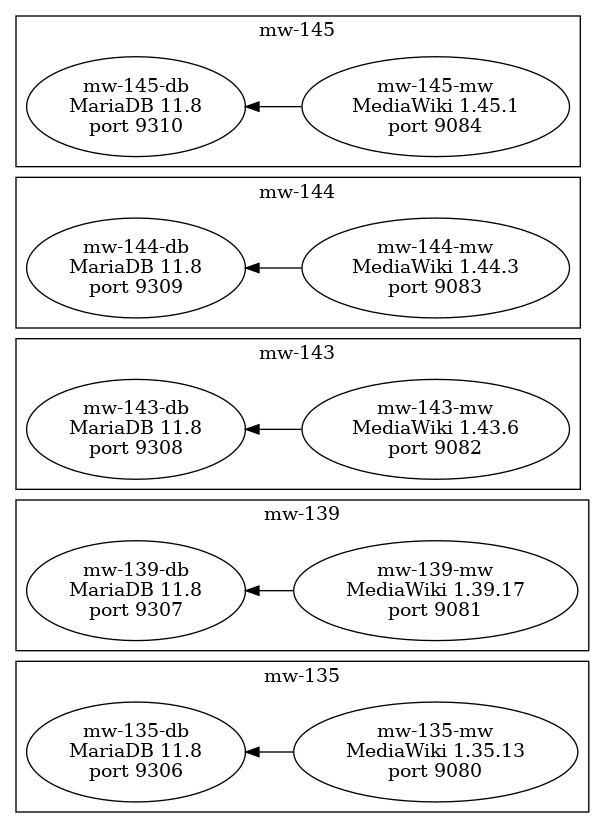
The core concept is a "MediawikiCluster" that is a set of docker applications that run MediaWiki instances with varying versions of MediaWiki and the underlying database. The graphic belows shows the docker containers which are created for different versions of Mediawiki
Installation
Prerequisites
Docker on Windows, Mac or Linux suppporting "docker compose up" using the Docker composer V2 CLI
Ubuntu 24.04 LTS installation
see https://docs.docker.com/engine/install/ubuntu/ on how to setup the docker repository
sudo apt-get install ca-certificates curl gnupg
sudo install -m 0755 -d /etc/apt/keyrings
curl -fsSL https://download.docker.com/linux/ubuntu/gpg | \
  sudo gpg --dearmor -o /etc/apt/keyrings/docker.gpg
sudo chmod a+r /etc/apt/keyrings/docker.gpg
echo \
  "deb [arch=$(dpkg --print-architecture) signed-by=/etc/apt/keyrings/docker.gpg] \
  https://download.docker.com/linux/ubuntu noble stable" | \
  sudo tee /etc/apt/sources.list.d/docker.list > /dev/null
sudo apt-get update
sudo apt-get install docker-ce docker-ce-cli containerd.io docker-compose-plugin
docker --version
Docker version 29.0.2, build 8108357
# Create the docker group if it does not exist
sudo groupadd docker 2>/dev/null || true
# Add your current user to the docker group
sudo usermod -aG docker "$USER"
docker run hello-world
Hello from Docker!
The "Hello from Docker" message shows that your installation appears to be working correctly.
Compatibility test
# test on a Mac OS machine 2022-07-02
docker 2>&1 | grep compose
  compose*    Docker Compose (Docker Inc., v2.4.1)
# test on an Ubuntu machine 2023-04-07
docker 2>&1 | grep compose
 compose*    Docker Compose (Docker Inc., v2.17.2)
Test of docker compose
No LSB modules are available.
Distributor ID:	Ubuntu
Description:	Ubuntu 24.04.3 LTS
Release:	24.04
Codename:	noble
docker compose (not docker-compose)
Ubuntu 22.04/24.04 LTS
docker compose version
Docker Compose version v5.0.0
macOs / ORBStack
docker compose version
Docker Compose version v2.40.3
pymediawikidocker installation via pip
pip install pymediawikidocker
# alternatively if your pip is not a python3 pip
pip3 install pymediawikidocker
upgrade
pip install pymediawikidocker -U
# alternatively if your pip is not a python3 pip
pip3 install pymediawikidocker -U
check version
mwcluster -V
pymediawikidocker 0.23.2 2025-12-18
Usage
mwcluster -h
usage: mwcluster [-h] [-a] [-d] [--debugLocalPath DEBUGLOCALPATH] [--debugPort DEBUGPORT]
                 [--debugRemotePath DEBUGREMOTEPATH] [--debugServer DEBUGSERVER] [-f] [-q] [-v]
                 [-V] [--article_path ARTICLE_PATH] [-bm] [-cn CONTAINER_NAME]
                 [-dcn DB_CONTAINER_NAME] [-el [EXTENSIONNAMELIST ...]] [-ej EXTENSIONJSONFILE]
                 [--forceRebuild] [-fu] [--host HOST] [-dp DOCKER_PATH] [--lenient] [--logo LOGO]
                 [-mv MARIADBVERSION] [--mysqlRootPassword MYSQLROOTPASSWORD]
                 [--mysqlPassword MYSQLPASSWORD] [-rp] [-p PASSWORD] [-pl PASSWORD_LENGTH]
                 [--prefix PREFIX] [--prot PROT] [--script_path SCRIPT_PATH] [--url URL]
                 [-sp SQL_PORT] [-smw SMW_VERSION] [-u USER] [--uid UID] [--gid GID]
                 [-bp BASE_PORT] [-vl [VERSIONS ...]] [--create] [--down] [--check] [--list]

Python controlled (semantic) mediawiki docker application cluster installation

options:
  -h, --help            show this help message and exit
  -a, --about           show version info and open documentation
  -d, --debug           enable debug output
  --debugLocalPath DEBUGLOCALPATH
                        remote debug Server path mapping - localPath - path on machine where
                        python runs
  --debugPort DEBUGPORT
                        remote debug Port [default: 5678]
  --debugRemotePath DEBUGREMOTEPATH
                        remote debug Server path mapping - remotePath - path on debug server
  --debugServer DEBUGSERVER
                        remote debug Server
  -f, --force           force overwrite or unsafe actions
  -q, --quiet           suppress all output
  -v, --verbose         increase output verbosity
  -V, --version         show program's version number and exit
  --article_path ARTICLE_PATH
                        change to any article_path you might need to set [default: ]
  -bm, --bind-mount     use bind mounts instead of volumes
  -cn CONTAINER_NAME, --container_name CONTAINER_NAME
                        set container name (only valid and recommended for single version call)
  -dcn DB_CONTAINER_NAME, --db_container_name DB_CONTAINER_NAME
                        set database container name [default: None]
  -el [EXTENSIONNAMELIST ...], --extensionList [EXTENSIONNAMELIST ...]
                        list of extensions to be installed [default: ['Admin Links', 'Header
                        Tabs', 'ParserFunctions', 'SyntaxHighlight', 'Variables']]
  -ej EXTENSIONJSONFILE, --extensionJson EXTENSIONJSONFILE
                        additional extension descriptions default: [default: None]
  --forceRebuild        force rebuilding [default: False]
  -fu, --force_user     force overwrite of wikiuser
  --host HOST           the host to serve / listen from [default: fur]
  -dp DOCKER_PATH, --docker_path DOCKER_PATH
                        the base directory to store docker and jinja template files [default:
                        /home/wf/.pymediawikidocker]
  --lenient             do not throw error on wikiuser difference
  --logo LOGO           set Logo [default: $wgResourceBasePath/resources/assets/wiki.png]
  -mv MARIADBVERSION, --mariaDBVersion MARIADBVERSION
                        mariaDB Version to be installed [default: 11.8]
  --mysqlRootPassword MYSQLROOTPASSWORD
                        set sql root Password [default: None] - random password if None
  --mysqlPassword MYSQLPASSWORD
                        set sql user Password [default: None] - random password if None
  -rp, --random_password
                        create random password and create wikiuser while at it
  -p PASSWORD, --password PASSWORD
                        set password for initial user [default: sysop-1234!]
  -pl PASSWORD_LENGTH, --password_length PASSWORD_LENGTH
                        set the password length for random passwords[default: 15]
  --prefix PREFIX       the container name prefix to use [default: mw]
  --prot PROT           change to https in case [default: http]
  --script_path SCRIPT_PATH
                        change to any script_path you might need to set [default: ]
  --url URL             will set prot host,script_path, and optionally port based on the url given
                        [default: None]
  -sp SQL_PORT, --sql_base_port SQL_PORT
                        set base mySql port 3306 to be exposed - incrementing by one for each
                        version [default: 9306]
  -smw SMW_VERSION, --smw_version SMW_VERSION
                        set SemanticMediaWiki Version to be installed default is None - no
                        installation of SMW
  -u USER, --user USER  set username of initial user with sysop rights [default: Sysop]
  --uid UID             User ID (default: 33 for www-data)
  --gid GID             Group ID (default: 33 for www-data)
  -bp BASE_PORT, --base_port BASE_PORT
                        set how base html port 80 to be exposed - incrementing by one for each
                        version [default: 9080]
  -vl [VERSIONS ...], --version_list [VERSIONS ...]
                        mediawiki versions to create docker applications for [default: ['1.35.13',
                        '1.39.17', '1.43.6', '1.44.3', '1.45.1']]
  --create
  --down
  --check
  --list
Examples
Pymediawikidocker_example_2022-10-26
create with default settings
Starts a cluster with versions 1.35.13,1.39.13, 1.43.2, and 1.44.0 using MariaDB 10.11. Essentially this is automatic generation of the configuration with a docker compose up for all versions asked for.
# force new user and random password
mwcluster --create -f -fu -rp
starting mw-135 1.35.13 docker application ...
...
starting mw-139 1.39.15 docker application ...
...
starting mw-143 1.43.5 docker application ...
...
starting mw-144 1.44.2 docker application ...
✔ Network mw-144_default    Created                                       0.1s
 ✔ Volume mw-144_mysql-data  Created                                       0.0s
 ✔ Volume mw-144_wiki-sites  Created                                       0.0s
 ✔ Volume mw-144_wiki-etc    Created                                       0.0s
 ✔ Volume mw-144_wiki-html   Created                                       0.0s
 ✔ Container mw-144-db       Started                                       5.4s
 ✔ Container mw-144-mw       Started                                       4.1s
mw-144-mw 🟢 started in 0.01s
mw-144-db 🟢 started in 0.01s
Initializing MediaWiki SQL tables ...
...
Starting periodic command scheduler: cron.
MediaWiki setup complete!
MediaWiki mw-144 is ready at ...
Mediawiki applications will be available at
http://localhost:9080 http://localhost:9080/index.php/Special:Version
http://localhost:9081 http://localhost:9081/index.php/Special:Version
http://localhost:9082 http://localhost:9082/index.php/Special:Version
http://localhost:9083 http://localhost:9083/index.php/Special:Version
check
mwcluster --check -f
1:checking 1.35.13 ...
mediawiki webserver container mw-135-mw:✅
mediawiki database container mw-135-db:✅
port binding 9080= expected  port 9080?:✅
Checking http://fur:9080/index.php?title=Special:Version ...
Special Version accessible ...:✅
Mediawiki Version 1.35.13= expected  1.35.13?:✅
Maria DB Version 11.8 fitting expected 11.8?:✅
2:checking 1.39.17 ...
mediawiki webserver container mw-139-mw:✅
mediawiki database container mw-139-db:✅
port binding 9081= expected  port 9081?:✅
Checking http://fur:9081/index.php?title=Special:Version ...
Special Version accessible ...:✅
Mediawiki Version 1.39.17= expected  1.39.17?:✅
Maria DB Version 11.8 fitting expected 11.8?:✅
3:checking 1.43.6 ...
mediawiki webserver container mw-143-mw:✅
mediawiki database container mw-143-db:✅
port binding 9082= expected  port 9082?:✅
Checking http://fur:9082/index.php?title=Special:Version ...
Special Version accessible ...:✅
Mediawiki Version 1.43.6= expected  1.43.6?:✅
Maria DB Version 11.8 fitting expected 11.8?:✅
4:checking 1.44.3 ...
mediawiki webserver container mw-144-mw:✅
mediawiki database container mw-144-db:✅
port binding 9083= expected  port 9083?:✅
Checking http://fur:9083/index.php?title=Special:Version ...
Special Version accessible ...:✅
Mediawiki Version 1.44.3= expected  1.44.3?:✅
Maria DB Version 11.8 fitting expected 11.8?:✅
5:checking 1.45.1 ...
mediawiki webserver container mw-145-mw:✅
mediawiki database container mw-145-db:✅
port binding 9084= expected  port 9084?:✅
Checking http://fur:9084/index.php?title=Special:Version ...
Special Version accessible ...:✅
Mediawiki Version 1.45.1= expected  1.45.1?:✅
Maria DB Version 11.8 fitting expected 11.8?:✅
down
 mwcluster --down -f
running docker compose down for mw-135 1.35.13 docker application ...
[+] down 7/7
 ✔ Container mw-135-mw          Removed                                                                      1.3s
 ✔ Container mw-135-db          Removed                                                                      0.6s
 ✔ Volume mw-135_wiki-etc       Removed                                                                      0.0s
 ✔ Volume mw-135_wiki-sites     Removed                                                                      0.0s
 ✔ Volume mw-135_wiki-html      Removed                                                                      0.5s
 ✔ Volume mw-135_mysql-data     Removed                                                                      0.6s
running docker compose down for mw-139 1.39.17 docker application ...                                        0.2s
[+] down 7/7
 ✔ Container mw-139-mw          Removed                                                                      1.4s
 ✔ Container mw-139-db          Removed                                                                      0.7s
 ✔ Volume mw-139_wiki-sites     Removed                                                                      0.0s
 ✔ Volume mw-139_mysql-data     Removed                                                                      0.6s
 ✔ Volume mw-139_wiki-html      Removed                                                                      0.6s
 ✔ Volume mw-139_wiki-etc       Removed                                                                      0.6s
 ✔ Network mw-139_mediawiki-net Removed                                                                      0.2s
running docker compose down for mw-143 1.43.6 docker application ...
[+] down 7/7
 ✔ Container mw-143-mw          Removed                                                                      1.4s
 ✔ Container mw-143-db          Removed                                                                      0.6s
 ✔ Volume mw-143_mysql-data     Removed                                                                      0.0s
 ✔ Volume mw-143_wiki-etc       Removed                                                                      0.1s
 ✔ Volume mw-143_wiki-html      Removed                                                                      0.7s
 ✔ Volume mw-143_wiki-sites     Removed                                                                      0.7s
 ✔ Network mw-143_mediawiki-net Removed                                                                      0.2s
running docker compose down for mw-144 1.44.3 docker application ...
[+] down 5/7
 ✔ Container mw-144-mw          Removed                                                                      2.8s
 ✔ Container mw-144-db          Removed                                                                      0.9s
 ✔ Volume mw-144_wiki-etc       Removed                                                                      0.0s
 ✔ Volume mw-144_mysql-data     Removed                                                                      0.1s
 ✔ Network mw-144_mediawiki-net Removed                                                                      0.1s
 ⠦ Volume mw-144_wiki-html      Removing                                                                     0.7s
 ⠦ Volume mw-144_wiki-sites     Removing                                                                     0.7s
running docker compose down for mw-145 1.45.1 docker application ...
[+] down 7/7
 ✔ Container mw-145-mw          Removed                                                                      1.8s
 ✔ Container mw-145-db          Removed                                                                      0.6s
 ✔ Volume mw-145_wiki-etc       Removed                                                                      0.0s
 ✔ Volume mw-145_wiki-html      Removed                                                                      0.8s
 ✔ Volume mw-145_wiki-sites     Removed                                                                      0.0s
 ✔ Volume mw-145_mysql-data     Removed                                                                      0.0s
 ✔ Network mw-145_mediawiki-net Removed                                                                      0.2s
Single 1.39.15 LTS
# python mwdocker/mwcluster.py  can be used instead of mwcluster if you test from your locally cloned environment
mwcluster \
  --create \
  --forceRebuild\
  --version_list 1.39.17\
  --base_port 8480\
  --sql_base_port 10308\
  --mariaDBVersion 11.8\
  --container_name mw139lts\
  --logo https://upload.wikimedia.org/wikipedia/commons/thumb/f/f9/Bigsmile_smiley_yellow_simple.svg/128px-Bigsmile_smiley_yellow_simple.svg.png
creating docker compose applications for mediawiki versions ['1.39.10']
starting mw139lts 1.39.17 docker application ...
Mediawiki application will be available at
http://localhost:8480 http://localhost:8480/index.php/Special:Version

Single 1.35 with Semantic Mediawiki - deprecated
There might be more current versions of SMW available see https://www.semantic-mediawiki.org/wiki/Semantic_MediaWiki_Version_History and adapt the example below if you see the need to do so.
Version 4.1.2
mwcluster \
  --create \
  --container_name smw4\
  --forceRebuild\
  --version_list 1.35.13\
  --base_port 8481\
  --sql_base_port 10307\
  --mariaDBVersion 10.11\
  --smw_version 4.1.2
creating docker compose applications for mediawiki versions ['1.35.13']
starting smw4 1.35.13 docker application ...
debug docker compose results - ports and other configuration parts
cd ~/.pymediawikidocker/smw4
docker-compose up
# in another terminal session:
docker ps
CONTAINER ID   IMAGE                   COMMAND                  CREATED              STATUS         PORTS                     NAMES
87a795d444eb   smw4_mw                 "docker-php-entrypoi…"   About a minute ago   Up 7 seconds   0.0.0.0:8481->80/tcp      smw4-mw
7ca3a0434d31   mariadb:10.11           "docker-entrypoint.s…"   About a minute ago   Up 7 seconds   0.0.0.0:10307->3306/tcp   smw4-db
open bash in docker container
docker exec -it smw4-mw /bin/bash
root@87a795d444eb:/var/www/html#
check installExtensions.sh script
cat /root/installExtensions.sh
#!/bin/bash
# install the required extensions
# WF 2021-06-23
cd /var/www/html/extensions

# Admin Links
# https://www.mediawiki.org/wiki/Extension:Admin_Links
git clone https://github.com/wikimedia/mediawiki-extensions-AdminLinks --single-branch --branch REL1_35 AdminLinks

# Header Tabs
# https://www.mediawiki.org/wiki/Extension:Header_Tabs
git clone https://github.com/wikimedia/mediawiki-extensions-HeaderTabs --single-branch --branch REL1_35 HeaderTabs

# SyntaxHighlight
# https://www.mediawiki.org/wiki/Extension:SyntaxHighlight
# no installation script command specified

# Variables
# https://www.mediawiki.org/wiki/Extension:Variables
git clone https://github.com/wikimedia/mediawiki-extensions-Variables --single-branch --branch REL1_35 Variables
check Semantic MediaWiki settings in LocalSettings.php
grep -i semantic LocalSettings.php
# enable Support for Semantic MediaWiki
# see https://www.semantic-mediawiki.org/wiki/Help:EnableSemantics
# Version of SemanticMediaWiki at install time: 4.1.1
wfLoadExtension( 'SemanticMediaWiki' );
enableSemantics();
# https://www.semantic-mediawiki.org/wiki/Help:$smwgQMaxInlineLimit
SMW Version 3.2.3
Installation
mwcluster \
  --create \
  --container_name smw3\
  --forceRebuild\
  --version_list 1.35.13\
  --base_port 8482\
  --sql_base_port 10308\
  --mariaDBVersion 10.11\
  --logo https://www.semantic-mediawiki.org/w/images/4/4e/SMW_logo_180.png\
  --smw_version 3.2.3
Check
mwcluster --check --container_name smw3 --version_list 1.35.13
Down
mwcluster --down --container_name smw3 --version_list 1.35.13 -f
running docker compose down for mediawiki versions ['1.35.13']
running docker compose down for smw3 1.35.10 docker application ...
[+] Running 3/3
 ⠿ Volume smw3_wiki-etc    Removed                                0.0s
 ⠿ Volume smw3_mysql-data  Removed                                0.1s
 ⠿ Volume smw3_wiki-www    Removed                                1.2s
Extensions
see Pymediawikidocker/Extensions
Debugging
Docker files
You'll find the files created by pymediawikidocker in ".pymediawikidocker" in your homedirectory.
pwd
/Users/***/.pymediawikidocker/mw-139
ls -l
total 128
-rwxrwxr-x 1 wf wf   349 Nov 18 12:40 addSysopUser.sh
-rw-rw-r-- 1 wf wf    23 Nov 18 12:40 composer.local.json
-rwxrwxr-x 1 wf wf   465 Nov 18 12:40 disable_sudo.sh
-rw-rw-r-- 1 wf wf  1952 Nov 18 12:40 docker-compose.yml
-rw-rw-r-- 1 wf wf  1410 Nov 18 12:40 Dockerfile
-rwxrwxr-x 1 wf wf   153 Nov 18 12:40 install_djvu.sh
-rwxrwxr-x 1 wf wf  1378 Nov 18 12:40 installExtensions.sh
-rw-rw-r-- 1 wf wf  6905 Nov 18 12:40 LocalSettings.php
-rw-rw-r-- 1 wf wf  1059 Nov 18 12:40 MwConfig.json
-rw-rw-r-- 1 wf wf   267 Nov 18 12:40 phpinfo.php
-rwxrwxr-x 1 wf wf  2339 Nov 18 12:40 plantuml.sh
-rwxrwxr-x 1 wf wf 10491 Nov 18 12:40 setup-mediawiki.sh
-rw-rw-r-- 1 wf wf   206 Nov 18 12:40 upload.ini
-rw-rw-r-- 1 wf wf 64482 Nov 18 12:40 wiki.sql
Check installed docker images
 docker images | grep mw
WARNING: This output is designed for human readability. For machine-readable output, please use --format.
mw-135-mw:latest        f4fac7e4ab24       1.58GB          347MB   U
mw-139-mw:latest        998a1c08c2f0        1.9GB          411MB   U
mw-143-mw:latest        12f3e2ba4d4a        2.1GB          458MB   U
mw-144-mw:latest        4a6a421be704       2.13GB          462MB   U
mw139-10lts-mw:latest   35aa59eb9dd2        1.9GB          411MB   U
mw139-11lts-mw:latest   71b736a6acff        1.9GB          411MB
mw139lts-mw:latest      8e83e31a47e1        1.9GB          411MB   U
smw4-mw:latest          10a6e1911648        1.9GB          411MB   U
Bash into docker containers
# Mediawiki container
docker exec -it mw-144-mw /bin/bash
docker exec -it mw-143-mw /bin/bash
docker exec -it mw-139-mw /bin/bash
docker exec -it mw-135-mw /bin/bash

# MariaDB container
docker exec -it mw-144-db /bin/bash
docker exec -it mw-143-db /bin/bash
docker exec -it mw-139-db /bin/bash
docker exec -it mw-135-db /bin/bash
</source>
Monkey patching
# Enable raw html in for the wiki
docker exec  mw1_35_8-mw sh -c "echo '\$wgRawHtml = true;\n' >> /var/www/html/LocalSettings.php"
No space left on device issue
e.g. when starting mariadb container see https://stackoverflow.com/questions/37645879/how-can-i-fix-docker-mac-no-space-left-on-device-error
Wiki Backup
The passwords are available from the docker files e.g.
grep PASS docker-compose.yml
      MYSQL_PASSWORD: "TnbKf2zGRmZPjUvz7B"
      MYSQL_ROOT_PASSWORD: "QWehnR9yLMY7YAb9pw"
In a docker bash a dump can be created
mysqldump wiki -u wikiuser --password=TnbKf2zGRmZPjUvz7B > /tmp/wiki.sql
and then copied to your local machine
docker cp mw1_36_0_db_1:/tmp/wiki.sql /tmp
Docker cleanup procedure
#!/bin/bash
# WF 2023-04-08
#
# ⚠️ ⚠️ ⚠️
#
#  kids  don't do this at home ...
#
# ⚠️ These commands will stop and remove all running docker containers (not only the ones created pymediawikidocker/the mwcluster command)
# kill/stop all running containers
docker kill $(docker ps -q)
#docker stop $(docker ps -aq)
# remove all docker containers
docker rm $(docker ps -aq)
# remove all images
# ⚠️ This command will remove all your images not only the ones created by pymediawikidocker (docker will hopefully refuse to do this without the -f option)
docker rmi $(docker images -q)
# ⚠️ these commands will remove all your volumes - you might loose valuable data if you don't check what your volumes contain before starting this command
# see https://stackoverflow.com/a/46091568/1497139
docker volume rm $(docker volume ls -qf dangling=true | xargs)
#⚠️ WARNING! This will remove:
#  - all stopped containers
#  - all networks not used by at least one container
#  - all dangling images
#  - all dangling build cache
docker system prune --force